Requesting Feedback on Chip Colors and Spot Design (Tina ceramics) (1 Viewer)

QuietMaple

Two Pair
Supporter Pro
Joined
Jun 21, 2025
Messages
287
Reaction score
894
Rewards
270
Location
USA
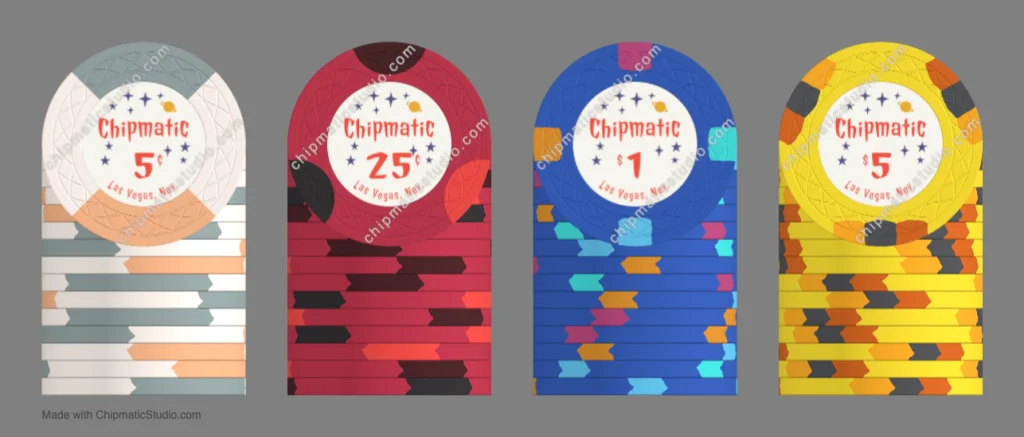
Well, for a while I've been wanting to design my own set of chips. I took a bit of a detour along the way to develop Chipmatic (so that I could visualize my designs), but now that I've released it, I'm actually returning back to the original project of developing my set! Anyways, this is what I've come up with:
chip_gallery(24).webp


I know they are my chips so I can do what I want, but I would love some feedback from more experienced chippers on what you think is working or not working with these design. One thing to note: the inlays will be totally different than what's pictured here, but I wanted to settle on the chip bodies first, so I'm using the current inlay as a stand in.

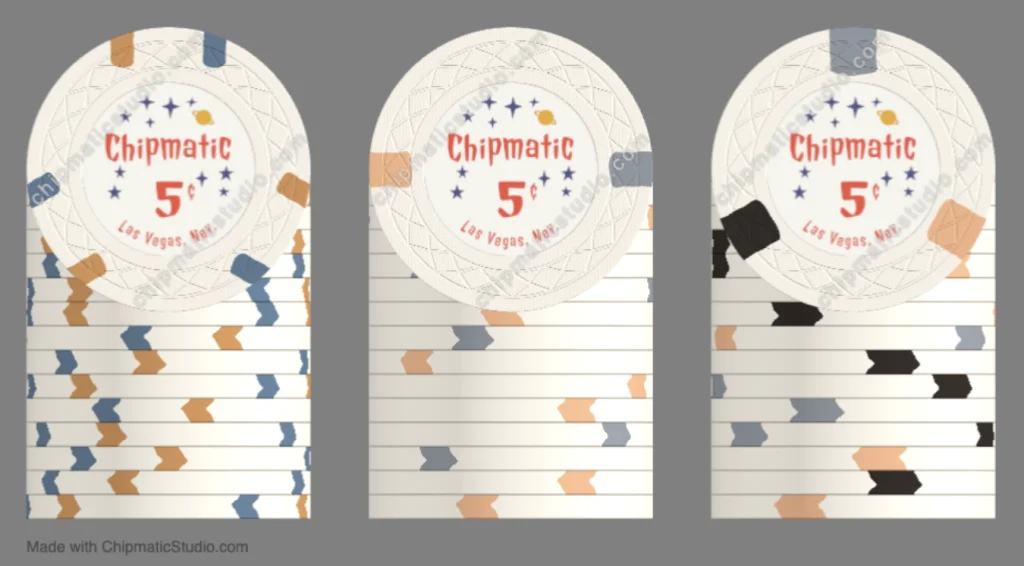
I'm happiest with the 5$ and 25¢ chip, but had more trouble settling on the 5¢ and $1. I definitely want beige and blue as the base colors for those chips, but I would consider changing up the spot colors. I like the face of my 5¢ chip, but worried it doesn't look as good in a stack. I tried to make a bit of a progression in the spots 2 -> 3 -> 4 -> 9.

Here are some alternate 5¢ designs:
Screenshot 2025-12-24 at 1.24.23 PM.webp


Anyways, would love to hear what people think before I pull the trigger!
 
Your $5 is my favorite too, followed by the $1.

The only thing I would be more aware of is (like the $5) having the accent colours being toooo similar. On the 25c and the $1 it's really hard to tell the difference between the black and dark red and light blue and aqua blue. From far away they look the same. So I would try to make the "middle" colour stand out more, someone more inbetween
 
I love all the chips in the first pic except for the $5. Just my personal opinion, but I think the maroon and black spots are too close in color. Both dark spots don't seem to offer enough contrast when in stacks.
 
I love all the chips in the first pic except for the $5. Just my personal opinion, but I think the maroon and black spots are too close in color. Both dark spots don't seem to offer enough contrast when in stacks.
Thanks for the feedback. You mean the red chip, right? I wasn't really thinking about the contrast of the spots compared to each other. I'll play around with it...
 
Your $5 is my favorite too, followed by the $1.

The only thing I would be more aware of is (like the $5) having the accent colours being toooo similar. On the 25c and the $1 it's really hard to tell the difference between the black and dark red and light blue and aqua blue. From far away they look the same. So I would try to make the "middle" colour stand out more, someone more inbetween
Thanks for the input! I'll try tweaking those and seeing how I like it.
 
Alright, I made some tweaks:

chip_gallery(26).webp


Versionleft (dark) spotmiddle spotright (bright) spot
originaloriginaloriginaloriginal
version Asame as previouslighter, hue matches base colorsame as previous
version Bsame as previoussame as previoushue matches base color
version Chue matches base colorsame as previoussame as previous
version Dsame as previoussame as previousoriginal slightly orange color

I'm leaning towards probably C or D.

C is more internally consistent with all the hues being the same, but perhaps D is better for the set overall because all of the other chips have some element of orange to them, so it would be a color that sort of ties them all together. They are very close though... I'm probably just splitting hairs here. Here they are in the full lineup anyways though:
version_c.webp
version_d.webp
 
I only saw the chips at first and didn’t see your write up, at that time I chose C.

But after seeing the write up and C and D in the whole line up, I agree and would choose D.
 
Thanks for the feedback. You mean the red chip, right? I wasn't really thinking about the contrast of the spots compared to each other. I'll play around with it...
Oops, yes, the .25 chip.
1766622102159.webp

I like more standout contrast but don't put too much weight on my "suggestions". It has to appeal to you.
Good Luck with your project and the Chipmatic is fantastic!
 

Create an account or login to comment

You must be a member in order to leave a comment

Create account

Create an account and join our community. It's easy!

Log in

Already have an account? Log in here.

Back
Top Bottom