Chipmatic Studio (a poker chip design tool)

Featured Chipmatic Studio (a poker chip design tool) (5 Viewers)

This is a really cool tool. One thing I'm struggling with is the slider for the colors. I have to believe someone has created a table for duplicating (or coming close to) CPC and Paulson colors. Using the codes instead of the slider. Anyone know where I could find this?

Also, once you create a set, is there a way to reorder it? For some reason, I started my design with my $25 chip. Then added the nickel, quarter, dollar, $5, $20 and $100. I'd like to move the $25 to second from the end. I guess I could delete the $100, recreate the $25, then delete the first $25 and recreate the $100. Is that the only way to do it?
1765947988336.webp
 
This is a really cool tool. One thing I'm struggling with is the slider for the colors. I have to believe someone has created a table for duplicating (or coming close to) CPC and Paulson colors. Using the codes instead of the slider. Anyone know where I could find this?

Also, once you create a set, is there a way to reorder it? For some reason, I started my design with my $25 chip. Then added the nickel, quarter, dollar, $5, $20 and $100. I'd like to move the $25 to second from the end. I guess I could delete the $100, recreate the $25, then delete the first $25 and recreate the $100. Is that the only way to do it?

View attachment 1608004
Timinater converted his approximation of CPC colors to CMYK:
https://www.pokerchipforum.com/threads/cpc-colour-code-matching-list.52094

If you want the hex code, use this CMYK-to-hex site:
https://colordesigner.io/convert/cmyktohex

There's a Paulson CMYK approximation thread somewhere here, I just couldn't find it.
 
Something occurred to me which I would imagine would be an easy add. A "Save as" option would be amazing, allowing us to make several similar sets.
Agreed! I think that would super useful. Especially for comparing two similar sets. Eventually I want to allow users to move chips between sets as well.

Also, once you create a set, is there a way to reorder it?
Yes! You can drag and drop the chips in the toolbar at the bottom of the page to reorder them. I need to figure out a way to make that feature a little more discoverable...

One thing I'm struggling with is the slider for the colors. I have to believe someone has created a table for duplicating (or coming close to) CPC and Paulson colors
Yeah, I think someone else suggested that to me too. It would be nice to have a palette that you could select colors from. I'll look into adding that in the future.

This is a really cool tool.
Thank you :) I appreciate all the feedback. Keep it coming!
 
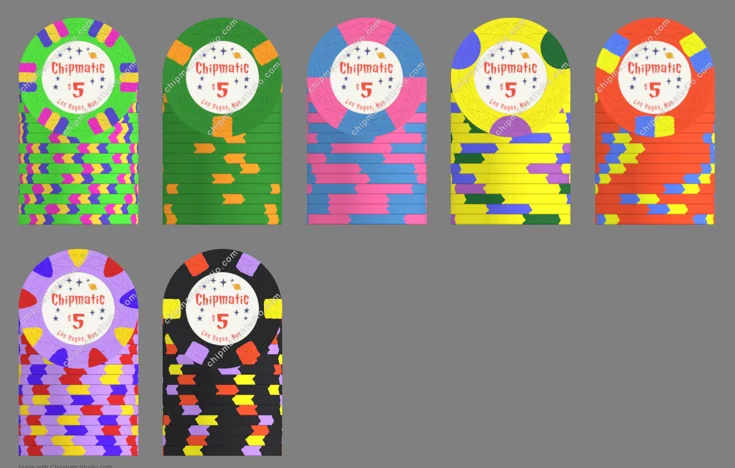
Thanks for the links. I pulled up Tim's table, then tweaked some of the colors more to my liking. This is where I'm at now. Any comments?

Chips denoms beginning with top left - 5 cent, 25 cent, $1, $5, $20. Second row - $25, $100.

I like having both $20s and $25s, depending on the size of the game. Some of you may recognize these chips from a old thread where I was planning a CPC set. One theme I was able to do with this set, that I couldn't do with CPC was keep all the spots in multiples of 3. The old 25 cent chip was a quarter pie. Now it's a hex pie, which CPC doesn't currently offer. Although I think they have in the past. Also the $20 and $25 use spots unavailable from CPC. I'm really happy with the 9V lavender chip, rather than the more common 8V.

1766018558233.webp
 
Thanks for the links. I pulled up Tim's table, then tweaked some of the colors more to my liking. This is where I'm at now. Any comments?

Chips denoms beginning with top left - 5 cent, 25 cent, $1, $5, $20. Second row - $25, $100.

I like having both $20s and $25s, depending on the size of the game. Some of you may recognize these chips from a old thread where I was planning a CPC set. One theme I was able to do with this set, that I couldn't do with CPC was keep all the spots in multiples of 3. The old 25 cent chip was a quarter pie. Now it's a hex pie, which CPC doesn't currently offer. Although I think they have in the past. Also the $20 and $25 use spots unavailable from CPC. I'm really happy with the 9V lavender chip, rather than the more common 8V.

View attachment 1608269
9V!
 
Agreed! I think that would super useful. Especially for comparing two similar sets. Eventually I want to allow users to move chips between sets as well.


Yes! You can drag and drop the chips in the toolbar at the bottom of the page to reorder them. I need to figure out a way to make that feature a little more discoverable...


Yeah, I think someone else suggested that to me too. It would be nice to have a palette that you could select colors from. I'll look into adding that in the future.


Thank you :) I appreciate all the feedback. Keep it coming!
One more question. Any plans to add a Paulson "W" spot. And whatever CPC calls theirs?

20251218_125401.webp
1766084279334.webp
 
The fact that you're able to get creative with the number of spots is a really great feature, I must say.

I wonder what @MrCatPants thinks of some of these new edge designs.
Well, we know that he hates tri-moons. Other than the 9V, I think the others are all legitimate spot patterns. Maybe not the green one with six triple 1/8ths either. What would you call that? 6T18?

Oh, and I guess the blue chip is normally four of each spot, not three.
 
Well, we know that he hates tri-moons. Other than the 9V, I think the others are all legitimate spot patterns. Maybe not the green one with six triple 1/8ths either. What would you call that? 6T18?

Oh, and I guess the blue chip is normally four of each spot, not three.
I've never seen the pattern you used for your $500 before, but I definitely wanna use it now.
 
Nice tool. Would be nice to have more options than circle, line, triangle, pie.

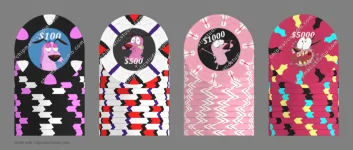
Designed "Courage the Cowardly Dog" set. The idea represents how I feel when betting higher value chips. :ROFL: :ROFLMAO:
Somebody should probably improve it though. I am not an artist.

https://chipmaticstudio.com/share/k697PxWvILpHCQWNJKKQp
 

Attachments

  • courage_set_new.webp
    courage_set_new.webp
    55.8 KB · Views: 80
Nice tool. Would be nice to have more options than circle, line, triangle, pie.
I like how you made "lightening bolts" on the $5000!

Are there other shapes you would like to see for spots? I chose this initial set because that's what's on "traditional" clay chips, but certainly open to adding others! The main other one on my list is something like a trapezoid spot, which is essentially a line with different widths at the two ends of the spot.
 
One more idea: Would adding the option for faux flecks be easy enough?
Yeah that would be pretty straightforward. Are you talking about flecks like on the Dunes of Arrakis set, or something else? (please share a photo if it's something else you have in mind!)
 
This tool will bring us some new fancy chip designs!
Not sure if such slim spots would get printed well on the edge…?

chipmatic supernova T.webp
 
nice! I would think those edge spots would print okay, but I don't have the experience to know for sure.
 
QuietMaple updated Chipmatic Studio (a poker chip design tool) with a new update entry:

Now looks great on mobile!

In the initial rollout of Chipmatic Studio, mobile support was a total after thought (or more accurately, I didn't think about it at all!). But 40% of visitors are coming on a mobile device, so I've done a lot of refactoring to make it usable on mobile. I think desktop is still a better experience, but mobile is way better than it was before. This is what the mobile UI looks like now:

Screen Shot 2025-12-25 at 18.24.22.webp

Read the rest of this update entry...
 
The MGM $100 chip and Majestic Star $100 chips in this thread are good examples of what I mean.

https://www.pokerchipforum.com/threads/black-friday-sale.81599/post-1696266
Thanks for the examples! Yeah something like that should be possible. Obviously it won't have that metallic "shimmer", but I could add a pattern for adding little flecks of color on the face of the chip. There are probably a few other features above that on the priority list though... so much to do!
 
Thanks for the examples! Yeah something like that should be possible. Obviously it won't have that metallic "shimmer", but I could add a pattern for adding little flecks of color on the face of the chip. There are probably a few other features above that on the priority list though... so much to do!
By all means! You've already done such a great job on this.
 
Thank you sooo much for this software, its so much easier to design chips without any design knowledge. If i may ask, is there a way to remove the watermark so that I can send my designs to be manufactured? Happy to pay a small fee to get a "premium" version without the watermarks!
 
Thank you sooo much for this software, its so much easier to design chips without any design knowledge. If i may ask, is there a way to remove the watermark so that I can send my designs to be manufactured? Happy to pay a small fee to get a "premium" version without the watermarks!
If you're sending it to Tina you won't need to
 
Thank you sooo much for this software, its so much easier to design chips without any design knowledge. If i may ask, is there a way to remove the watermark so that I can send my designs to be manufactured? Happy to pay a small fee to get a "premium" version without the watermarks!
When you "share" your work, the tool will be able to automatically send the correct files to Justin to be included in his monthly Tina group buys. Super convenient!
 
Thank you sooo much for this software, its so much easier to design chips without any design knowledge. If i may ask, is there a way to remove the watermark so that I can send my designs to be manufactured? Happy to pay a small fee to get a "premium" version without the watermarks!

I'm so glad you've found it useful!

Right now, the workflow for using Chipmatic to manufacture designs is to order through Justin/Broken Arrow. He has access to the production-ready art files (without watermarks). I’ve set it up this way because orders placed through Broken Arrow provide financial support to me for the ongoing development and maintenance of the project.

If ordering though Justin doesn't work for you for some reason (like perhaps you're outside of his shipping area), send me a DM and I'm happy to try to work things out in a way that would work for you while still keeping things sustainable on my end.
 

Create an account or login to comment

You must be a member in order to leave a comment

Create account

Create an account and join our community. It's easy!

Log in

Already have an account? Log in here.

Back
Top Bottom