

galactica_actual
Sitting Out
I have no experience in graphic design... learning as I go and using Inkscape. There are things that I like and don't like so far, but I wanted to share and get some feedback from the enthusiast community. The biggest thing I think I'd like to do is tone down the "noise." It seems a little busy compared to many of the designs I really think are slick here on PCF. That said, looking back at the small collection of casino chips I have, some of those are downright gaudy.
@QuietMaple's design tool is so much fun to play with.
The idea here is a theme on the Victorian architecture common in my neck of the woods in Humboldt, CA, sometimes known as "The Lost Coast." I used Nano Banana (Gemini) to generate the image.
Cash set is $.05, $.25, $1, $5, $20
Tournament set is 25, 100, 500, 2500, 10000
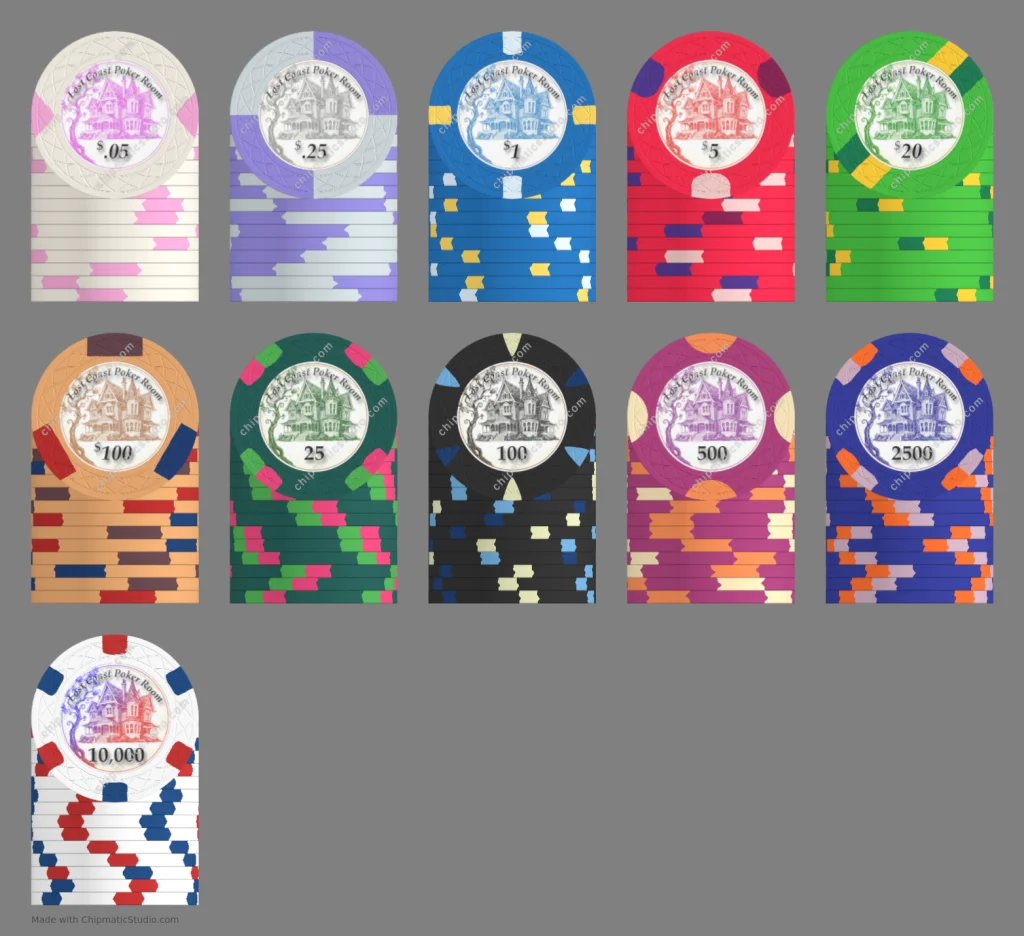
These were mocked up with the 43mm Web mold. Whenever I get the design settled in, I'm considering placing an order with @justincarothers. For those of you who've done your own design and ordered this way, how did they turn out?
@QuietMaple's design tool is so much fun to play with.
The idea here is a theme on the Victorian architecture common in my neck of the woods in Humboldt, CA, sometimes known as "The Lost Coast." I used Nano Banana (Gemini) to generate the image.
Cash set is $.05, $.25, $1, $5, $20
Tournament set is 25, 100, 500, 2500, 10000
These were mocked up with the 43mm Web mold. Whenever I get the design settled in, I'm considering placing an order with @justincarothers. For those of you who've done your own design and ordered this way, how did they turn out?
Last edited:


