Barrington poker table thread (18 Viewers)

I'm not sure I follow the reasoning on moving the pilot hole 1/4" from the original center. If the new cup holder is simply a larger diameter, the center point should still be the center point regardless of the size of the hole. Moving the pilot hole would actually shift the entire cup holder off-center relative to the original location, although that’s perfectly fine if the intent is to reposition the cup holder itself rather than just enlarge the existing opening.

I drilled mine centered on the original location, and they came out perfectly centered on the rail!
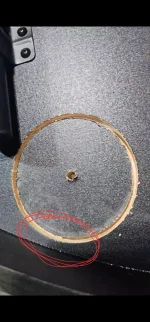
I think the reasoning was to avoid cutting to close to the outside edge of the table into the side frame.
I could be wrong but since reading majority of the modified cup holders on these barrington tables, looks like they all used the the 1/4" off original center hole and it turned out all centered.
do you have a picture of yours by chance? just for reference.
 
Sure thing! I posted a couple of pictures earlier in the thread, but he is a picture of one of the finished cupholders:

FOUR.webp
 
that looks centered, I'm wondering the different variations of measurements that still leads to the same center placement at the end.
That’s possible. I tried to make this as easy as possible for myself and not overcomplicate the process. Just take it slow. I’m certain you will be satisfied with the end result. Happy to answer any questions along the way!
 
I'm thinking I could maybe go a couple more MM towards this outside frame to avoid having the cup holders sit to closely to the inner edge towards the felt.
 

Attachments

  • 1000090942.webp
    1000090942.webp
    221.2 KB · Views: 21
3-5/8" hole saw
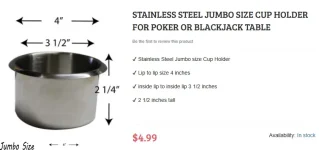
large cup holders 4" lip to lip, inside diameter is 3.5"
3 5/8” should work, although the cupholders may or may not fit as snugly. I used a 3 1/2” and had to go back and slightly elongate some of the holes to get the new cupholders to fit. But they do not move whatsoever.

Can you explain your concern about the lip being too close to the edge of the rail/felt? If you move it in, they may not be exactly center as you had previously mentioned.
 
3 5/8” should work, although the cupholders may or may not fit as snugly. I used a 3 1/2” and had to go back and slightly elongate some of the holes to get the new cupholders to fit. But they do not move whatsoever.

Can you explain your concern about the lip being too close to the edge of the rail/felt? If you move it in, they may not be exactly center as you had previously mentioned.
i mean like move it tad bit further away from the felt, since I have a bit more room towards the outside edge before hitting the rail frame, if that makes sense.
 
i mean like move it tad bit further away from the felt, since I have a bit more room towards the outside edge before hitting the rail frame, if that makes sense.
I suppose that wouldn’t hurt anything - just might not be perfectly centered if that was the look you were going for. The rail is 5” across so you really only have about 1/2” on each side of the cupholder to play with. My thoughts are center it as best you can and call it a day!
 
i mean like move it tad bit further away from the felt, since I have a bit more room towards the outside edge before hitting the rail frame, if that makes sense.
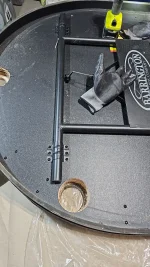
I also used the step by step guide by @RadicusScout including moving the center point 1/4” closer to the felt. That enabled not hitting the edge frame of the table by about 1/8” margin . So if you want to, you probably have room to reduce this 1/4” center offset a bit.
IMG_7342.webp

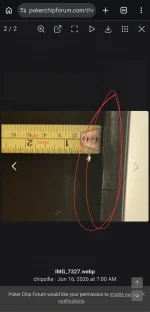
There may be some manufacturing variation table to table. You could verify this edge frame clearance for each cup holder by drilling a small hole from the topside at the edge of each existing cup holder hole and measure between the small drilled hole to the edge frame. That’s what I did. That gave me confidence the saw would be close but wouldn’t hit the edge frame.
IMG_7327.webp
 
ok so I just finished mine. I went with 1-7/8 instead of 2" and turned out pretty good.
when you mention to find the outside edge wouldn't we just use that side wall underneath to determine the max sidewall distance?
 

Attachments

  • 1000091015.webp
    1000091015.webp
    150.5 KB · Views: 29
  • 1000090995.webp
    1000090995.webp
    421.4 KB · Views: 29
  • 1000091008.webp
    1000091008.webp
    335.6 KB · Views: 28
I also used the step by step guide by @RadicusScout including moving the center point 1/4” closer to the felt. That enabled not hitting the edge frame of the table by about 1/8” margin . So if you want to, you probably have room to reduce this 1/4” center offset a bit.
View attachment 1692025
There may be some manufacturing variation table to table. You could verify this edge frame clearance for each cup holder by drilling a small hole from the topside at the edge of each existing cup holder hole and measure between the small drilled hole to the edge frame. That’s what I did. That gave me confidence the saw would be close but wouldn’t hit the edge frame.
View attachment 1692032
wouldn't this be max edge you can saw?
like go right up to this wall and start drill and you'll still be within frame without damaging the edge?
 

Attachments

  • 1000091069.webp
    1000091069.webp
    51.2 KB · Views: 13
wouldn't this be max edge you can saw?
like go right up to this wall and start drill and you'll still be within frame without damaging the edge?
Sure, you could line up your saw a hair away from the wall and start sawing. You’d just be deviating from the step by step process @RadicusScout posted. As long as you have a way to otherwise saw and be aligned with the existing smaller cup holder hole, you can change the process. The step by step process provides a center guide pilot hole to ensure such an alignment.

For me, slight damage to the wall is less critical. More important is that the new cut hole is located where you want and looks good from the top.
 
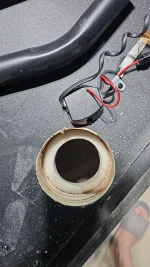
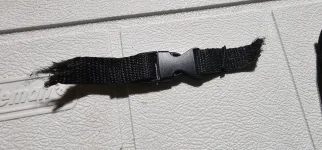
anyone have any suggestions on a new lock to keep the folded table in place, my clip straps came out when doing the ungraded cup holders.
 

Attachments

  • 1000091180.webp
    1000091180.webp
    289 KB · Views: 16
anyone have any suggestions on a new lock to keep the folded table in place, my clip straps came out when doing the ungraded cup holders.
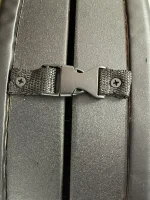
I used two small screws I had lying around in the garage to fasten it on the outside of the frame. It’s in the same place as before (near the cupholders on each side), but outside instead of mounted underneath the old cupholders.
 

Attachments

  • IMG_8059.webp
    IMG_8059.webp
    460.8 KB · Views: 11
Doesn't seem the barrington got on the amazon prime days sale and staying steady on walmart. Anyone know if it's likely to go on sale anytime soon? Thinking i might just buy it on walmart for the 249.
 
5V LED
________
Thanks to @greedyintern, @RadicusScout, @dmoney, and others for the great cupholder and LED mod instructions.
https://www.pokerchipforum.com/threads/barrington-poker-table-thread.30910/post-2352520
https://www.pokerchipforum.com/threads/barrington-poker-table-thread.30910/post-2405037

Just finished mine and it turned out great thanks to those detailed instructions.

For the COB LED lights, I did make a minor change which I haven’t seen posted. In case anyone’s interested:

The earlier LED lights are 12V, as are the dimmer and power bank. I instead used a 5V LED strip and dimmer. I wanted 5V so I could use a standard power bank, like the kind to charge a cell phone. It didn’t appeal to me to have a dedicated 12V power bank just for the table….I don’t have any other devices needing the 12V and I already have multiple 5V power banks.

It turns out Amazon has many 5V LED cob strips to choose at very low price. In fact, they typically have a standard USB-A plug already attached to the strip. If you plug it into a standard 5V power bank, it works! It’s too bright of course, so a dimmer is needed. Many have a basic dimmer also built-in to that USB plug, making a very low cost solution. I tried it, and it works, though only providing 6 discrete steps of dimming from about 100% down to about 25%. I chose a 5v strip with just the plain USB plug (no dimmer) and added a separate 5V dimmer which allows continuous dimming from 100% down to 0% (off), so I can use it at about the 15-20% setting which I prefer for my eye comfort.

The 5V strip I used was 3 meters long, enough for half the table with about 20” extra. So I bought two (about $10 each). There is one available 5 meters long, but that is barely long enough, or maybe a hair short. Buying two pieces also means I get two USB plugs and don’t have to add COB strip connectors.

5V COB LED lights
5V Dimmer
Male USB plug to bare wire cable
Female USB plug to bare wire cable (Optional. Delete if willing to cut and strip wiring)

Pictures:

Finished table:
View attachment 1586828

Final mounted dimmer hardware:
View attachment 1586829

Hardware in testing mode: This is where I used the optional Female-USB-plug-to-bare-wire cable for convenience. This cable can be skipped if you simply cut the end of the LED strip near the strip’s USB plug, strip the wires, and mount them directly to the dimmer. I did that in the picture above (final mounting):
View attachment 1586830

Comparison of original Barrington LED lights to the 5V cob strip light. The latter is much more densely packed like the 12V LED’s. FYI, the 12V LED’s density is 480 LED’s per meter, the ones used by @greedyintern. The 5V LED density is less at 400 LED/M. It looks fine to me. If I dim it way down I can see individual LED’s similar to @greedyintern described also for the 12V LED’s. When lit, it looks good and fairly defused to me.
View attachment 1586831

Most of the 5V LED’s on Amazon are actually even lower density, 320 LED/meter. Here’s a comparison of 320 LED/M (left) to 400 LED/M (right). Both are 5V LEDs. Also the left side is a 8mm strip (like @greedyintern 12V 480 LED/meter strip), while the right side is 5mm I used. The right strip is powered at minimum setting ~ 10% so it looks very faint, while the left strip is at about 25% (min setting of its built-in cheap dimmer). You can see the discrete LED’s of both by zooming-in. 400 LED/M strips were harder to find, which is why I used the 5mm strip. Both look good to me when lit up, especially compared to the original Barrington LEDs.
View attachment 1586832


I took some current measurements at different dimmers setting with an inserted ammeter. The full 3 meter length was measured. I cut about 20” off from each strip for actual install, so actual game night current usage will be proportionally lower than in this table below. For the 400 LED/M strip I measured both/two strips while connected in parallel so I could verify the power bank would be sufficient. All readings are current in Amperes:

100%85%75%50%25%0%
Two 5V LED strip with 400 LED/m, 5mm3.11 A1.97 A1.32 A0.75 A0
One 5V LED strip with 320 LED/m, 8mm1.27 A1.09 A0.84 A0.12 A

From row 1, the required power bank needed can be calculated by: Capacity = Current x Time.
E.g., at 50% dimmer setting, Capacity = 1,320mA x 1 hr = 1320 mAH rated power bank needed for each 1hr of run time. My 10,000mAH USB power bank is more than enough, especially since I’ll be running closer to the 20% dimmer setting and can get close to 13hrs of run time. I verified this, left the lights on for 9 hours at 20%, and the power bank was still 50% full (based on its indicator lights).
Here’s the 5V LED with 320 LED/m, 8mm with a built-in dimmer and USB plug.

Hey what's that adaptor connected from the power bank to the cable?
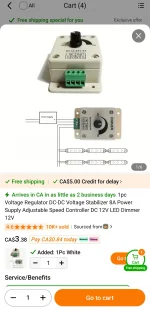
Also for the dimmer switch is it ok to use a 12v one like this?
 

Attachments

  • 6445.webp
    6445.webp
    72.2 KB · Views: 8
Hey what's that adaptor connected from the power bank to the cable?
Also for the dimmer switch is it ok to use a 12v one like this?
For the adaptor, I think you mean the USB-C-male-to-USBA-female adaptor. I needed it because my existing power bank only had a USB-C port, whereas the black cable from the dimmer had a USB-A plug on it.

USBC Male to A Female​

1783138374435.webp


I'm not sure about the dimmer you posted since I can't read the whole description. That's a 12V dimmer, so it will only work for 12V LED strip lights. You would need a 5V dimmer (like I used) if you use 5V LED lights. Also, it needs to be a PWM (pulse width modulation) style dimmer, so check the description to confirm.
 
For the adaptor, I think you mean the USB-C-male-to-USBA-female adaptor. I needed it because my existing power bank only had a USB-C port, whereas the black cable from the dimmer had a USB-A plug on it.

USBC Male to A Female​

View attachment 1698583

I'm not sure about the dimmer you posted since I can't read the whole description. That's a 12V dimmer, so it will only work for 12V LED strip lights. You would need a 5V dimmer (like I used) if you use 5V LED lights. Also, it needs to be a PWM (pulse width modulation) style dimmer, so check the description to confirm.
Hey @chipzilla! I used your instructions and parts list to put the 5V COB LED lights on my table tonight, they look great. I’ve got one problem - when I plug into a 5V wall adapter they dim perfectly, however with the power bank I bought on Amazon anytime I go below full brightness they flash and freak out. My table is in the middle of the room so I definitely need a powerbank - which do you use?
 
Hey @chipzilla! I used your instructions and parts list to put the 5V COB LED lights on my table tonight, they look great. I’ve got one problem - when I plug into a 5V wall adapter they dim perfectly, however with the power bank I bought on Amazon anytime I go below full brightness they flash and freak out. My table is in the middle of the room so I definitely need a powerbank - which do you use?
This is the powerbank I'm using:
https://www.amazon.com/dp/B0DCNNB7JD?ref_=ppx_hzsearch_conn_dt_b_fed_asin_title_2&th=1
1783146483328.webp

Nothing special about it. Just a standard 5v powerbank.

Strange that yours works at full brightness but not at lower setting. What dimmer and powerbank are you using? Same exact parts list you say...? Also, if you used exactly the same 5v LED strip light as me, did you cut off (required) the built-in cheap dimmer before connecting it to the new dimmer?
 
Last edited:
This is the powerbank I'm using:
https://www.amazon.com/dp/B0DCNNB7JD?ref_=ppx_hzsearch_conn_dt_b_fed_asin_title_2&th=1
View attachment 1698591
Nothing special about it. Just a standard 5v powerbank.

Strange that yours works at full brightness but not at lower setting. What dimmer and powerbank are you using? Same exact parts list you say...? Also, if you used exactly the same 5v LED strip light as me, did you cut off (required) the built-in cheap dimmer before connecting it to the new dimmer?
Hey, yes! Same dimmer and strips, although the strips didn’t have a dimmer already at the link from your post. I’ll try some other power banks around the house to see if I can find one that works.

Edit: Come to think of it, when I tested it after installing the first strip it did work. It was on my when I added the second strip that it struggled. I’m wondering if the second strip in parallel is the reason it’s having issues…
 
Last edited:
I’ll try some other power banks around the house to see if I can find one that works.

Edit: Come to think of it, when I tested it after installing the first strip it did work. It was on my when I added the second strip that it struggled. I’m wondering if the second strip in parallel is the reason it’s having issues…

Two strips in parallel is definitely the correct hook up and should work. I tried a second very old 5v battery bank and it works too. So hopefully your other power banks solves the problem.

If your other power banks don't solve the problem, then I suspect you have a defective 5V dimmer and can try replacing it.

Hey, yes! Same dimmer and strips, although the strips didn’t have a dimmer already at the link from your post.
Oh, right. the strip I installed didn't have the cheap built-in dimmer, just a USB-A plug. (it was a different strip I tested that had the cheap built-in dimmer).
 

Create an account or login to comment

You must be a member in order to leave a comment

Create account

Create an account and join our community. It's easy!

Log in

Already have an account? Log in here.

Back
Top Bottom