Gojira777
Pair
iOS via Testflight.Are you using the web app, iOS app, or Android app?


iOS via Testflight.Are you using the web app, iOS app, or Android app?


Ah, good catch. I'll fix that.@AppMakerRonB
I don’t know if this tilts anyone else, but on the players screen, for seating information, it shows seating for players starting with seat zero instead of seat one. Not sure if there is a reason for it, but that then throws off all the rest of the player’s seats by one seat even though the table screen shows the correct seat number for the player. Any way that can be changed so it starts with seat one instead of 0?
Yep, I'm seeing the same thing on iOS. The fix should be in the next release.iOS via Testflight.

Thanks for reporting this! I checked error logs and there was an error playing an audio alert on an Android device about 4 hours ago. I fixed the intermittent issue in the code. The fix will be in the next release, which I'm hoping will be in a day or two (after finishing up some other changes).I've been testing the timer ahead of an up coming tournament, and found an odd issue. I'm running the app on Android (s10) with the output going to HDMI using a usb-c to hdmi adapter. When the level changes, the sound for the level change doesn't play, and the verbal announcement for the blinds occurs 30 seconds into the level. I do have a frequency generator running in the background to emit a constant low-frequency sound so that the audio doesn't go to sleep. The issue doesn't occur when I use a PC. I'm going to do some more testing to see if it's something related to the display output, but it's odd.

Great suggestions! I'll update the max chip image uploads to 50 in the next beta version.Used the app a few times now and definitely bang up job on a user friendly feature filled timer!
Two update asks tho-
Ability to change the table shape and seat locations if possible.
View attachment 1648500
Also increase number of chips allowed if possible.
Most of the players here have lots of chips.
Another thought that may or may not be a copyright issue, add a database so we arent all uploading pics of duplicate chips?
Awesome!Great suggestions! I'll update the max chip image uploads to 50 in the next beta version.
As far as table shape options, round? More like a Casino poker table shape? Rectangular? All of the above? Any other shapes?
And seat locations, currently they are just evenly spaced around the table, starting with seat 1 in the top center. What other seat location options are you wanting?
As far as a way to share chip set images, so anyone can use them, that's a great idea. I've got to think of a good way to do this...


You could export the stats and save to your notes app or even just text it to yourself, then when you open the csv file in the notes app or the text, it is all on one screen. May not be an option if your wifi is messed up but if the stats are available on your phone or ipad and you need everything in one screen shot, that is definitely a viable option.Not sure what the problem was but we had a heck of a time with the timer last night. I think it may have been a WiFi issue and may not be app related at all. But thought would put it here in case you can check an error log and see what was going on.
We had a tournament. 2 iPads (older, not running latest iOS but still has the TestFlight and pokerhq program on them) 2 iPhones and an android phone. None of the devices would synch to the tournament. I had to adjust the timer on the iPads manually to get them to be somewhat close. If I changed something on my phone (pause, knockout, reseating, etc) it did not update on the other iPads. I thought it might be a WiFi issue. I shut off one of the iPads and put the other one on my phones hotspot to see if that would fix the problem and it didn’t.
The TV cut out a few times suggesting a WiFi issue. When I checked a speed test, it reported 80 mbs so should have been fast enough. I didn’t know how often the program would check with the server to make sure things were synched up, etc.
We keep track of knock outs in our league and award bonus points for knocking out one of the top 3 players. So I need that log plus the ranking of the players for the night. So I kept taking screen shots in case I lost everything. There is not a good view to see all this on one screen shot like the old poker timer had. It is in the info/data screen but the ranking is all the way to the left and the knock outs are all the way to the right. It would be nice to be able to reorder the columns or hide columns not needed.
Thanks for working on this program. All in all, I love the updates and am excited for the next round.
I'm wondering if it could have been related to this: To keep data consistent across devices, Poker Club HQ uses NTP (Network Time Protocol) to verify that device clocks are synchronized. If a device’s clock drifts more than 10 seconds from the actual time, sync is temporarily disabled to prevent timestamp conflicts.We had a tournament. 2 iPads (older, not running latest iOS but still has the TestFlight and pokerhq program on them) 2 iPhones and an android phone. None of the devices would synch to the tournament. I had to adjust the timer on the iPads manually to get them to be somewhat close. If I changed something on my phone (pause, knockout, reseating, etc) it did not update on the other iPads.
That's a great suggestion, I've added it to our to do list: https://github.com/users/pokerclubhq/projects/1We keep track of knock outs in our league and award bonus points for knocking out one of the top 3 players. So I need that log plus the ranking of the players for the night. So I kept taking screen shots in case I lost everything. There is not a good view to see all this on one screen shot like the old poker timer had. It is in the info/data screen but the ranking is all the way to the left and the knock outs are all the way to the right. It would be nice to be able to reorder the columns or hide columns not needed.
Getting close to releasing an update that fixes some player renaming issues along with other bug fixes and enhancements.I had another issue tonight. Changed name of player entered to new player name and it showed correct in edit but didn't update in the list. I was able to get it to update after closing and re-opening the settings menu tho.
I was only using online from website through windows.
Yes, to skip a break (or blink level), just tap the "next" button. If the timer is running it will be disabled, so first tap the pause button.One tiny little feature request or just confirmation on how to do it, but are you able to skip a break??
Great suggestion. I've added it to our to do list: https://github.com/users/pokerclubhq/projects/1/views/1Another feature that I think could be neat is having something where dealers or players can update their chip stack like in the WSOP+ app and showing the top x on the timer screen (as an option like tables).
It is possible to show payouts on the timer screen, it's just a matter of customizing the screen contents! I need provide more help with this, and that is on my to do list, too.Along these lines it would be neat to have payouts available in this way too instead of it's own screen.
Select screen icon (top right), then screen contents in the pop up, then select + to add a row, within the row you just created hit the plus and create a row then do it again for a second row, within those two, hit plus and select text this time, for the left text pick payout ordinals and the right payout amounts. Should look like this:it would be neat to have payouts available in this way too instead of it's own screen.
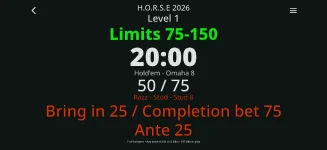
I do want the app to have better support for other game types. I'll need to do some research on the best way to do that. I welcome any suggestions!I have another possible thing to consider. But understand if you say nope, gonna pass on that. It seems that all the timers are based on a flop game basis (holdem omaha). We held a horse tournament and the timer worked but had to enter all the 7 card stud games manually on each blind. Don’t know how you would incorporate that but maybe just a notes option For each scene. Notes1, Notes2 etc.
I do want the app to have better support for other game types. I'll need to do some research on the best way to do that. I welcome any suggestions!
Each level can already be customized in advance to have whatever content/note you want on it (unless I am misunderstanding what you’re asking for…) and you can create and have your text saved as an option to select as wellI think just the ability to add a note on a blind level should be sufficient. Then you could utilize the view builder to add or remove that note. Just my thoughts anyway...
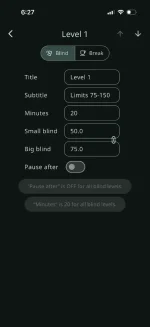
You can add a title and subtitle to each level, and those will show up in the timer screen:I think just the ability to add a note on a blind level should be sufficient. Then you could utilize the view builder to add or remove that note. Just my thoughts anyway...
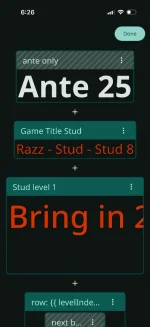
Setting the Title and/or Subtitle on each of levels in the "Blind structure" screen is the best way, assuming you want different titles or subtitles for different levels.Honestly I don’t know what I am asking for. Just some way to make it easier. I did go to screen contents and added new fields. But then had to change that for every blind level. That is probably the best way to customize it as much as possible. I just didn’t know if you UI experts could think of a way to maybe have alternate blind options on the blind setup menu and then maybe allow users to choose blind 1 or 2 or both? Or maybe just notes 1 and notes 2 sections that you can change on the blind level menu. That would be easier than changing the screen contents. It did take me awhile to figure that out. All in all probably an hour to customize the screen and then change for every blind level. Then I wanted to change the font size. I selected for all blind levels and guess what. All my customized content was replaced by that one blind levels customized content. So no I have to do it all over again for our next tournament. Again, something I can fix and will save a backup next time. But just thought I would throw it out there.

Maybe this feature is buried somewhere or this has already been discussed but is it possible to change the table colors? My main table is red and my secondary table is green. Would be cool to have the tables on the app match the tables in real life.