First try at a chip design (3 Viewers)

RofoPoker

Sitting Out
Joined
Oct 21, 2024
Messages
46
Reaction score
60
Rewards
190
Location
Pennsylvania
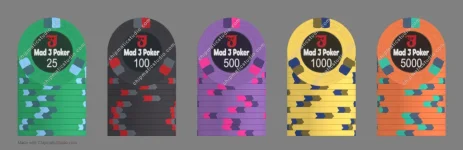
Got to playing around with the Chipmatic studio (very cool!) and came up with a fairly standard palette for a T25-base tournament set. I'm a fan of classic chip colors and simple spot patterns, so I certainly don't think I've put together anything revolutionary here. Just color patterns that seemed to go well together and/or stuck with me based on what I've seen over the years.

"Mad J" is just a play on my name, or more accurately a play on my login ID for my kids' school's online portal which starts with the first three letters of my last name (MAD) and my first initial (J). I'm not much of a graphic designer so the label is pretty basic, but again I'm a man of simple tastes. The "Angry J" character was designed with the help of Copilot.

Anyway after doing all this I'm seriously considering putting in a custom order through the group buy thread, but if I'm going to spend that money I want to really like what I get out of it. Any suggestions from fellow chippers would certainly be appreciated!
 

Attachments

  • chip_gallery (6).webp
    chip_gallery (6).webp
    34.2 KB · Views: 264
My 2¢…

Go for a different accent color on the hundo since it sits next to the green 25. Maybe blues?

Maybe some different spot colors on the yellow chip since it sits next to the orange 5k and you already used a gray spot on the 25. Maybe a red and tan?

Overall love the simplicity of the label and the classic 3d14 spots! Look forward to seeing where it ends up.
 
Last edited:
Got to playing around with the Chipmatic studio (very cool!) and came up with a fairly standard palette for a T25-base tournament set. I'm a fan of classic chip colors and simple spot patterns, so I certainly don't think I've put together anything revolutionary here. Just color patterns that seemed to go well together and/or stuck with me based on what I've seen over the years.

"Mad J" is just a play on my name, or more accurately a play on my login ID for my kids' school's online portal which starts with the first three letters of my last name (MAD) and my first initial (J). I'm not much of a graphic designer so the label is pretty basic, but again I'm a man of simple tastes. The "Angry J" character was designed with the help of Copilot.

Anyway after doing all this I'm seriously considering putting in a custom order through the group buy thread, but if I'm going to spend that money I want to really like what I get out of it. Any suggestions from fellow chippers would certainly be appreciated!

Same comment I seem to have on almost all these design threads:

Having something in the inlay pick up the base color of each denom really helps pull things together, and prevents the inlay from looking generic. And/or one of the spot colors.

You could change the color of the logo to reflect the base or a spot color… Or change the name color… Or the background circle… Or the numerals.

Or add a coordinated color pattern to the black background to tie it into the base.
 
Three first chips are Dark you need a lighter purple next to black at least.

some color matching on the inlay is popular but by no means a default thing to do.
 
Go for a different accent color on the hundo since it sits next to the green 25. Maybe blues?
I hear you but I note that Teddy KGB has green edge spots on his hundos and, well, he is the one guy in the game you don't want to F with.

But yeah, your point is taken and I will play around with it. I think the black with green is stuck in my brain because of Rounders and because my first ever chip set were Nexgen 8000 series which also has a black chip with green edge spots. There's a nostalgic feeling for me with that combo.


You could change the color of the logo to reflect the base or a spot color… Or change the name color… Or the background circle… Or the numerals.

Or add a coordinated color pattern to the black background to tie it into the base.
Yeah I will play around with that too, thanks for the suggestion. Again I'm not much of a designer and there's an OCD part of me that likes the inlay to be the same for every chip (except for the denoms of course) but I acknowledge maybe that's too limiting. And hey it's easy enough to play with the mock up so why not?


Three first chips are Dark you need a lighter purple next to black at least.
Good suggestion!


Thanks all for the input so far!
 
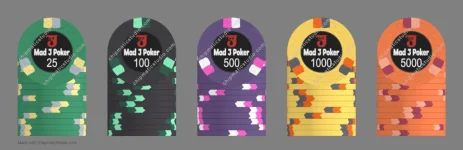
Ok so after some tweaking, here's the second iteration.

I changed the base purple of the 500 chip, and updated edge spots on all the chips, trying not to be repetitive.

The inlay background color is now different across each chip instead of all being black and tries to subtly blend each base color into the respective inlay (with the exception of the 100 inlay which is slightly navy). I wanted the logo to stay red, so I kept the backgrounds dark, but I like the way they look now versus the same black across all of them. The color is intentionally subtle but to Taghkanic's point it does help to pull the whole thing together. Good suggestion!

Anyway, I'm happy with this second version although not sure I'm done playing just yet.
 

Attachments

  • chip_gallery (16).webp
    chip_gallery (16).webp
    33.8 KB · Views: 97
1769354520032.webp

Just a try

Food for thought, what is your favorite chip in your lineup? Also just continue to mess around and remember to look at them few days later as well.


In my tournament sets I follow the vision to have the 1k and 5k my favorites as there are the ones going to be in biggest stacks

Ps I don’t see the subtle change in the Inlays
 
Food for thought, what is your favorite chip in your lineup?
It's probably always going to be the 100. I tend to want that one to be the heart of the set. I was trying to make that one the most "on brand" with the second iteration, matching the edge spot to the logo for example. I like your attempt and also agree with your suggestion to let it marinate a few days and come back to it.

Ps I don’t see the subtle change in the Inlays
Fair, it's intentionally subtle but you can see it if you look at the old and new together. Probably most evident on the 25. Here are both versions against plain white chips (top row old, bottom row new). I could make the difference a little more bold.

chip_gallery (23).webp
 
Last edited:
I really like them! I'm a big fan of the simple spot pattern and understated logo. No need to try to shove too much into a chip. The 25 and 500 are probably my favorite in the new lineup, but I also really like the 100 and 5000 from v1. I think I like analogous color palettes in general.
 
I really like them! I'm a big fan of the simple spot pattern and understated logo. No need to try to shove too much into a chip. The 25 and 500 are probably my favorite in the new lineup, but I also really like the 100 and 5000 from v1. I think I like analogous color palettes in general.
Thanks! And thanks for the design tool! It's fantastic, nice job!
 
Since i'm having so much fun with Chipmatic I decided to step away from the tournament set for a little and try a cash set. Not necessarily looking to actually get this set made as I can't seem to talk my regs away from tournament format (not for lack of trying), but hey, playing in the sandbox is free so why not?

chip_gallery (34).webp
 
I think the inlay may look a bit more interesting if you treated the text like a logo, and I'm not sure you need to make the word "poker" as large.
While I like that dark background, having shadows brings out the text. Also, if you want to match colors to the base color, you can do that with the color of the denom, that way, the rest of the inlay is consistent from chip to chip.
I fiddled a bit with it to give you an idea what I mean:
1.webp
 
Since i'm having so much fun with Chipmatic I decided to step away from the tournament set for a little and try a cash set. Not necessarily looking to actually get this set made as I can't seem to talk my regs away from tournament format (not for lack of trying), but hey, playing in the sandbox is free so why not?

View attachment 1626992
I'm digging the $100! Nice spot progression all around.
 
I think the inlay may look a bit more interesting if you treated the text like a logo, and I'm not sure you need to make the word "poker" as large.
While I like that dark background, having shadows brings out the text. Also, if you want to match colors to the base color, you can do that with the color of the denom, that way, the rest of the inlay is consistent from chip to chip.
I fiddled a bit with it to give you an idea what I mean:
Thanks! I like where you're going with those designs! Definitely giving me some ideas to play around with. Out of curiosity, which software did you use for that?
 
Thanks! I like where you're going with those designs! Definitely giving me some ideas to play around with. Out of curiosity, which software did you use for that?
It’s a combo of Photoshop and Illustrator. PM me if you want to make changes, or I can send you the files
 
I'm digging the $100! Nice spot progression all around.
Yeah thanks I thought it turned out pretty good for a first pass and yes was very happy with the spot progression. I like the $100 too but might play with the colors and pattern a bit just to give it some distinction from other $100s I've seen. I think my favorite chip there is the $1.
 
A word of caution. Tina's labels tend to run darker and more saturated when printed. So, if you match the color in your artwork, it will definitely print darker. I tend to make colors on the label artwork a shade or two brighter and less saturated to compensate.
 
A word of caution. Tina's labels tend to run darker and more saturated when printed. So, if you match the color in your artwork, it will definitely print darker. I tend to make colors on the label artwork a shade or two brighter and less saturated to compensate.
Good to know, thanks. Assume that applies to the background as well?

Been wondering about the chip colors too. I've been using the color picker a lot, just tweaking stuff by hand until it looks good to me and then writing down the hex code so I can find the colors I liked later on. Is Tina's process that precise or should I rely more on the preset options? I mean, I know it will never exactly match what I'm seeing on screen but neither do I want to land on a combination I really like only to find out it's something they can't really get that close to.

Freely admitting I don't know a whole lot about the chip manufacturing process.


Really liked the colors on the original 1000.
Thanks! I do too but was a little wary of giving the 1000 an orange edge spot when it sits next to the orange 5000 chip. Quite possible I'm overthinking it of course.
 
I've been using the color picker a lot, just tweaking stuff by hand until it looks good to me and then writing down the hex code so I can find the colors I liked later on. Is Tina's process that precise or should I rely more on the preset options?

The fidelity of Tina's color reproduction for a "custom" color (some arbitrary hex code) won't be any different than the fidelity for one of the preset options. The preset options are just there are to help the design process and give the user ideas, but not because they are known to print especially well with Tina or anything like that. The regular caveats apply for colors that you choose from the preset options and for "custom" colors: especially bright or highly saturated colors may appear duller, darker, or slightly different in tone when printed vs what you see on your monitor.
 
Last edited:
Color accuracy from Tina has always been a crapshoot. If you’re a bit flexible in your expectations, you’ll be happy with the results.
That’s just one of the trade-offs for a decent custom chip at a very affordable price.
 
Color accuracy from Tina has always been a crapshoot. If you’re a bit flexible in your expectations, you’ll be happy with the results.
That’s just one of the trade-offs for a decent custom chip at a very affordable price.
Fair enough thanks. I went through and "brightened" my labels a touch, although I don't know how well it shows up here (brighter labels are the bottom row). Just trying to calibrate how far you typically adjust. I can see it in my source file.
chip_gallery (42).webp
 
Fair enough thanks. I went through and "brightened" my labels a touch, although I don't know how well it shows up here (brighter labels are the bottom row). Just trying to calibrate how far you typically adjust. I can see it in my source file. View attachment 1627980
Those look better. Not sure about the colored backgrounds though, they all may print fairly dark and be harder to distinguish between them when printed. It’s just tough to know for sure how much it will shift.
 
Those look better. Not sure about the colored backgrounds though, they all may print fairly dark and be harder to distinguish between them when printed. It’s just tough to know for sure how much it will shift.
Thanks for the guidance. I guess worst case with the backgrounds is they all end up looking much the same, which is no different than what would happen if I made them all the same right now. So, might as well just go with the colors and hope for the best.

Anyway these are starting to feel close to final to me. Thanks again for the guidance on the labels! I may still play around with the edge spot colors, and it looks like Chinese New Year will give me some time to chew on it if I'm reading the group buy thread correctly. Although that may not be a good thing, way too much opportunity to overanalyze it! :ROFL: :ROFLMAO:
 
...I may still play around with the edge spot colors, and it looks like Chinese New Year will give me some time to chew on it if I'm reading the group buy thread correctly. Although that may not be a good thing, way too much opportunity to overanalyze it! :ROFL: :ROFLMAO:
We are always our own worst client. :ROFL: :ROFLMAO:
 
As predicted, I played around with the spots. And also just for grins updated the label format on the cash set to match the tournament set just for completeness and because this is fun. Again probably not going to get the cash set actually made right now, but this is a good base for a potential future purchase.

Feeling pretty good about the tournament set though. Going to force myself to stay away from it for a week and then come back and see if I still like it.
chip_gallery (94).webp
chip_gallery (96).webp
 
Just a little suggestion for the cash labels if you do have them made: I would center the number part of the denomination and have the "$" symbol pushed further to the left. Looks more natural to me that way.
 
Just a little suggestion for the cash labels if you do have them made: I would center the number part of the denomination and have the "$" symbol pushed further to the left. Looks more natural to me that way.
Agreed. I tend to move the numeral just a bit off center with the $. If you look at the label from a distance, as long as it looks centered, it is centered.
It doesn’t matter if something is perfectly centered if it doesn’t look like it. :ROFL: :ROFLMAO:
 
Just a little suggestion for the cash labels if you do have them made: I would center the number part of the denomination and have the "$" symbol pushed further to the left. Looks more natural to me that way.
Oh absolutely. I thought that right away too, and if I ever do proceed with that set I will make that tweak along with a few others. (Or even if I'm not buying the set I may do it just for OCD purposes! :ROFL: :ROFLMAO:)
 

Create an account or login to comment

You must be a member in order to leave a comment

Create account

Create an account and join our community. It's easy!

Log in

Already have an account? Log in here.

Back
Top Bottom