Deckmate 1 Guide (10 Viewers)

Hey guys, does anyone have the bridge size adaptors available or know of a good alternative? I much prefer bridge size cards but don't have any with my machine. Thanks.
It’s nice to have for sure but you can still use bridge cards without the adapter. The adapter bars are only used to square the deck up post-shuffling. You could probably find a very small metal (or even wood) rod/tube to screw into place.
 
Update: I had a cash game last night in the barn. The shuffler had its first hiccup. The red light comes on. The message says Push red to clear cards. There are no cards to clear . When I hit the red button the door opens and stays open. I messaged minedelta and read through the guide. He said it probably has something to do with the #4 wire. I used the link Buge provided to order the cable and supplies to replace.

Tonight I removed the cover to become more familiar with the unit. I pressed each cable connection down to make sure everything was connected solid. A couple of the connections felt loose or slightly crooked which happened to include the #4 connection. I plugged in the unit to see what would happen and now it is working as it should. I am transporting the shuffler in my vehicle to the game so maybe moving it around has caused the connections to shift.

The only other hiccup that happens is every once in a while a card with flip up sideways and the shuffler will stop with the red light coming on. I occasionally hear a loud clatter during the shuffle like a card may have tried to flip. Any thoughts on that? Does something need to be adjusted?

 
Update: I had a cash game last night in the barn. The shuffler had its first hiccup. The red light comes on. The message says Push red to clear cards. There are no cards to clear . When I hit the red button the door opens and stays open. I messaged minedelta and read through the guide. He said it probably has something to do with the #4 wire. I used the link Buge provided to order the cable and supplies to replace.

Tonight I removed the cover to become more familiar with the unit. I pressed each cable connection down to make sure everything was connected solid. A couple of the connections felt loose or slightly crooked which happened to include the #4 connection. I plugged in the unit to see what would happen and now it is working as it should. I am transporting the shuffler in my vehicle to the game so maybe moving it around has caused the connections to shift.

The only other hiccup that happens is every once in a while a card with flip up sideways and the shuffler will stop with the red light coming on. I occasionally hear a loud clatter during the shuffle like a card may have tried to flip. Any thoughts on that? Does something need to be adjusted?
I would always run an autosetup before the game. If you are using bridge cards and not using the bridge bars it could be a reason why you have a flip card. You could also try reajusting the card height to see if that helps. Did reseating cable 4 fix that issue or do you still see it every once in a while?

Another step you could try is add some slack to the belt that feeds the cards. I find the deckmate runs better if you have a bit of slack. Traveling with the deckmate could shaken then motor downwards pulling it tight.
 
I would always run an autosetup before the game. If you are using bridge cards and not using the bridge bars it could be a reason why you have a flip card. You could also try reajusting the card height to see if that helps. Did reseating cable 4 fix that issue or do you still see it every once in a while?

Another step you could try is add some slack to the belt that feeds the cards. I find the deckmate runs better if you have a bit of slack. Traveling with the deckmate could shaken then motor downwards pulling it tight.
I have been shuffling for about 30 minutes since reseating the cable 4 and besides one flipped card, its running good. Thank you for the suggestions. I want to learn.
 
Hey guys, does anyone have the bridge size adaptors available or know of a good alternative? I much prefer bridge size cards but don't have any with my machine. Thanks.
Hey there. I have a couple of deckmates now and use poker size cards 99% of the time. I’m pretty sure I can live without a set of the bridge size adapters. I haven’t a clue what a fair price/value is, however. @minedelta care to enlighten us? Is this something that you see on eBay (not that eBay is a good barometer, just the first that sprung to mind).
 
The last/only set i sold was like 75 dollars for someone else. It was a suggestion if he was using the full size cards without bridge bars not the actual solution as it could be a multiple things. All the shufflers i sell have the bridge bars so he has a set.
 
The last/only set i sold was like 75 dollars for someone else. It was a suggestion if he was using the full size cards without bridge bars not the actual solution as it could be a multiple things. All the shufflers i sell have the bridge bars so he has a set.
I gotcha. I didn’t read enough of the thread, apparently. I knew the Deckmates you sold were complete, obviously. I didn’t see that it was purchased through you. I thought you were just voluntarily helping, as you often do. 😉
 
Update: I had a cash game last night in the barn. The shuffler had its first hiccup. The red light comes on. The message says Push red to clear cards. There are no cards to clear . When I hit the red button the door opens and stays open. I messaged minedelta and read through the guide. He said it probably has something to do with the #4 wire. I used the link Buge provided to order the cable and supplies to replace.

Tonight I removed the cover to become more familiar with the unit. I pressed each cable connection down to make sure everything was connected solid. A couple of the connections felt loose or slightly crooked which happened to include the #4 connection. I plugged in the unit to see what would happen and now it is working as it should. I am transporting the shuffler in my vehicle to the game so maybe moving it around has caused the connections to shift.

The only other hiccup that happens is every once in a while a card with flip up sideways and the shuffler will stop with the red light coming on. I occasionally hear a loud clatter during the shuffle like a card may have tried to flip. Any thoughts on that? Does something need to be adjusted?
IMG_4221.webp
You can try this to fix the cards flipping in the platform
 
New DM1 owner here (thank you PCF!)

I was able to solve the "Remove Cards" startup error by unplugging and replugging #4.

For DM1 owners with a "Remove Cards" error at start up, I suggest not skipping any of the posts in the first three pages of this thread, particularly the bottom of page #2 and beginning of page #3.
 
Last edited:
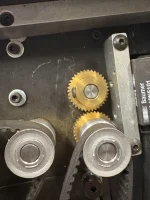
I need to replace a couple of brass gears that are worn with the newer version of the plastic ones that my 2nd shuffler has
How do I identify the part numbers. Best place to purchase them? Thx
 

Attachments

  • IMG_1531.webp
    IMG_1531.webp
    121.4 KB · Views: 60
  • IMG_1530.webp
    IMG_1530.webp
    169.8 KB · Views: 54
Good afternoon friends.
I'm from Brazil.

I need help. I have a DM1 (type 1 shuffle disabled) that takes an average of 40 to 50 seconds to shuffle, but I have a DM1 and it's taking more than 120 seconds. Can someone help me improve the shuffling time to a maximum of 50 seconds?
 
Good afternoon friends.
I'm from Brazil.

I need help. I have a DM1 (type 1 shuffle disabled) that takes an average of 40 to 50 seconds to shuffle, but I have a DM1 and it's taking more than 120 seconds. Can someone help me improve the shuffling time to a maximum of 50 seconds?
Go into your setup menu and change the delay after drop to the lowest settings that still allows the DM to shuffle properly. I took a pic of the procedure in the manual for you. Let me know if you need anymore help.
IMG_4555.webp
 
I've already completed the entire process and it's still taking 120 seconds to shuffle Has anyone else experienced this same shuffling problem? And is there a software update for the DM1?
 
The DM1 usually shuffles in 40 to 50 seconds. I have a DM1 that is shuffling in 120 seconds. That's a very long time to shuffle.
 
The DM1 usually shuffles in 40 to 50 seconds. I have a DM1 that is shuffling in 120 seconds. That's a very long time to shuffle.
I think it would help if you captured a video of a shuffle cycle so that we can observe and listen for any issues that we would be able to recognize.
 
Delay After Platform Drop (0-500 ms) -- what are you guys running on your shufflers?

I'm at 200 ms which is noticeably faster than 300 ms. Below that my DM1 makes some sounds I don't recognize and don't really like, and the speed gain is not that great so 200 seems like the goldilocks zone for me.
 
Delay After Platform Drop (0-500 ms) -- what are you guys running on your shufflers?

I'm at 200 ms which is noticeably faster than 300 ms. Below that my DM1 makes some sounds I don't recognize and don't really like, and the speed gain is not that great so 200 seems like the goldilocks zone for me.
I believe that is what I’m running mine on as well
 
0 Or 100 for me.
got a video of the sound?
I do not, but I will capture that next time I boot it up.

It's not a dreadful, alarming sound -- just different enough to make me nervous and not want to push it for a few seconds of gain.
 
I also don’t like to push the machine too hard by placing in on 0ms. 200 is a comfortable spot that doesn’t seem like it’s pushing it. 0ms almost seems like it’s trying to catch up the whole time
 
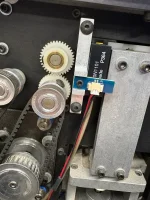
13 This sensor is the The Reflective Card Drop sensor that has been replaced with Look-Thru Card Drop Sensor. Serial numbers 104653 and up will be fitted with the updated part. Since Mine was remanufactured it was upgraded to the new type of sensor. The one pictured above in the side profile you can see the old sensor and can be retrofitted with the new one. This kit should have everything to complete the upgrade..

The Update Kit (‘DU1178-KIT’)
I’ve been occasionally getting clean CDS error. Has anyone done this upgrade and/or know where I can get the upgrade part? @minedelta
 
You can try with Patriot Gaming. It's been slow with parts atm. If you did the upgrade you would need to reflash to bios chip and I never done that before.
 
Before I cut a hole in my table, I wanted a side table for my shuffler. I also wanted it as small as possible and ended up with this. https://www.temu.com/ca/-1pc--side-...-in-a-rustic-brown-end-g-601101276315430.html

It's super tight but JUST fits. You're also losing the power bar hole so you basically get a free power bar.
It's also really flimsy (and now top heavy) but I've never had it fall over. If it was a "permanent" thing I'd take the "feet" off and bolt some plywood or something to the bottom and put sandbags or something heavy on it.
 

Create an account or login to comment

You must be a member in order to leave a comment

Create account

Create an account and join our community. It's easy!

Log in

Already have an account? Log in here.

Back
Top Bottom