Playing with Unique ChipMatic Spot Designs - Post 'Em (2 Viewers)

Taxi500

3 of a Kind
Joined
Sep 11, 2022
Messages
566
Reaction score
588
Rewards
106
Location
Charlotte, NC
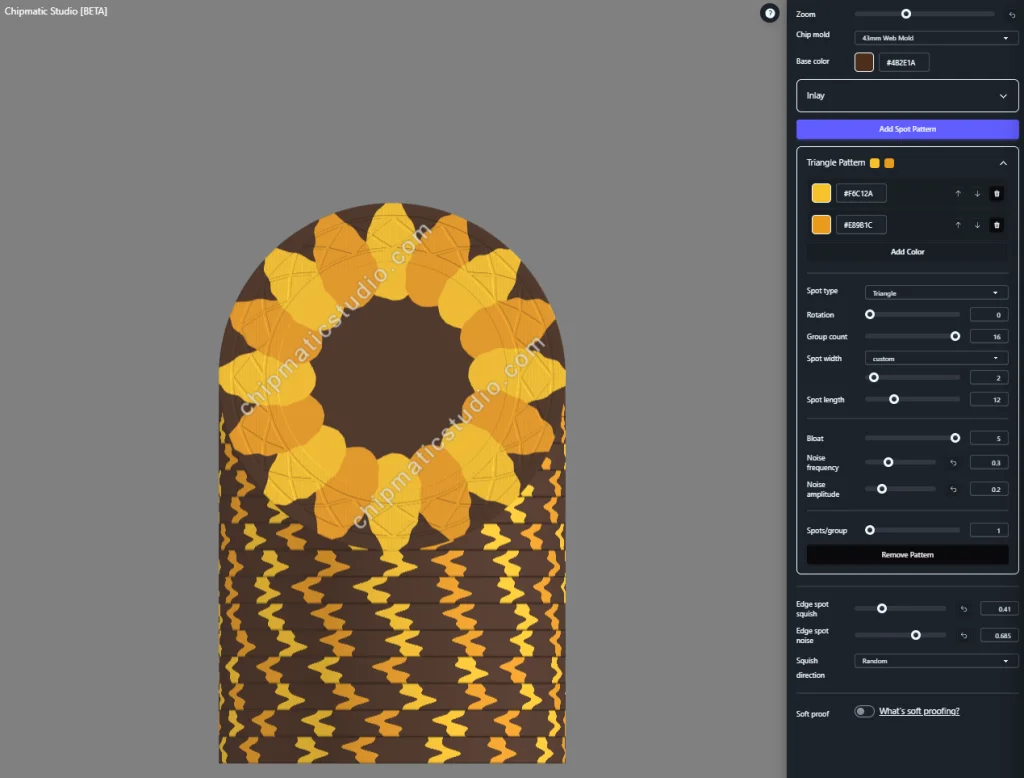
I've been playing around with my new favorite chip design tool (chipmaticstudio.com if you don't know) and found a fun little design that reminded me of a flower... so then I made a sunflower. Has anyone else found some unique ones? If so, Post 'Em!

Here's the 'flower spot' specs.. might mess around and make a flower inspired set.
1769373618858.webp
 
Love it! I've bee playing around with something kinda similar with overlapping spots:
Screenshot 2026-01-25 at 3.44.38 PM.webp
 
Love it! I've bee playing around with something kinda similar with overlapping spots:
WOW that's a really cool design. I love that... I hope these types of designs are actually printable though if we ever wanted to have something done.

Here's my "Beach Ball" (I am not putting a lot of thought into this lol)
1769374135099.webp
 
The "Beach Ball" is awesome! I love the pattern on the rolling edge that results from the stripes on the face. I don't see any reason why these designs couldn't be printed. For my green chip, the shades of green might be a bit too close together, but other than color selection I would think it would be fine.
 
Spamming thread but here's another one I made... trippy Geometric triangles (Or a Star of David??). This doesn't really look that good on the spot patterns but hey... it's out there.
1769374581063.webp
 
While not very unique in design...might be unique in application. You can add designs only to the EDGE of the chip and not the top. In these cases it works really well if you want to design a realistic looking coin for example:

Edge only design.webp
Edge only design_2.webp


You can do this by adding a Pie Pattern (layer) and then making the "spot length" only 0.01 so that it only shows up on the sides of the chips.
 
While not very unique in design...might be unique in application. You can add designs only to the EDGE of the chip and not the top. In these cases it works really well if you want to design a realistic looking coin for example:


You can do this by adding a Pie Pattern (layer) and then making the "spot length" only 0.01 so that it only shows up on the sides of the chips.
Smart. Very Smart. Hadn't considered Layering like that!

edit: My Star of David chip up there can have it's spot pattern "fixed" by using the Pie Spot layering trick.
 
Spamming thread but here's another one I made... trippy Geometric triangles (Or a Star of David??). This doesn't really look that good on the spot patterns but hey... it's out there.
Woah. Love how the triangles look like they are interlocking!
 

Create an account or login to comment

You must be a member in order to leave a comment

Create account

Create an account and join our community. It's easy!

Log in

Already have an account? Log in here.

Back
Top Bottom