Direct Printing with Tina (1 Viewer)

EagleSlide

New Member
Joined
Oct 23, 2025
Messages
3
Reaction score
1
Rewards
0
Location
Singapore
Hello Chippers, Chipper wannabe from Singapore here and looking for advice.

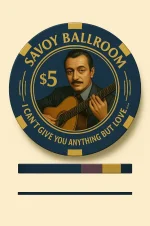
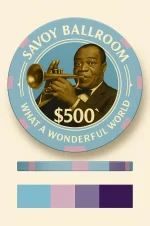
Had an idea to create a chip series of jazz greats that performed at the Savoy Ballroom back in the early 90s.

I have 0 design background and experienced (Failed art in highschool. I mean who fails art?) so I've been toying around with AI the last two months. It can take up to 12-24 hours doing up a chip because... Hallucinations. Something always almost is off despite the most detailed prompts. (Designers are definitely not going to be replaced anytime soon imo)

Been in direct contact with Tina and he/she has been a great help... In tempering my expectations. But seriously, Tina's really awesome in replying and trying to guide me along so the designs can finally go to print.

So apparently PNG cannot be sent to print and have to be converted into vector files. And according to Tina, cartoonist designs print better than photorealistic. Text outside of the inlay won't be clear and part of the inlay will be butchered (cut away, literally). His/Her advice is to just design the inlay and leave the edgespots up to them. If I want the text (logo/lyrics) curved on the chip, they won't come out clear, but squash everything into the inlay and I risk details getting cut off.

I've been playing with AI vector image converter platforms with varying success.

May I know how much it is to hire a designer to put the logo 'Savoy Ballroom' into the inlay (I've given up on lyrics and will have Tina print them on the outside for me).

Any advice at all will be accepted. I think I'm unconsciously incompetent at this stage.

Will try to upload some design examples
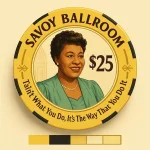
 

Attachments

  • 133597.webp
    133597.webp
    190.6 KB · Views: 59
  • 133598.webp
    133598.webp
    76.3 KB · Views: 52
  • 133599.webp
    133599.webp
    78.7 KB · Views: 57
  • 127597.webp
    127597.webp
    160.9 KB · Views: 56
  • 127465.webp
    127465.webp
    194.4 KB · Views: 56
  • 127594.webp
    127594.webp
    163.7 KB · Views: 55
You can have the high level of detail of your original design, but only if you use Tina’s hybrid chips. It’s a ceramic chip with a recess and a highly-detailed printed label in the center. However, the labels are smaller than you show in your chips, around 24mm on a 39mm chip.

I suggest the photo be done in photoshop, and placed into the illustrator file, and all text and outside colors done in Illustrator.
If doing it this way, having the full “photo” each person be helpful, as you can add the round border in Illustrator and move the photo as you like within.

With your alternative designs, those should print ok directly on regular ceramics. I can try to convert them to vector if you like, send me a pm and we can work out details.
 
You can have the high level of detail of your original design, but only if you use Tina’s hybrid chips. It’s a ceramic chip with a recess and a highly-detailed printed label in the center. However, the labels are smaller than you show in your chips, around 24mm on a 39mm chip.

I suggest the photo be done in photoshop, and placed into the illustrator file, and all text and outside colors done in Illustrator.
If doing it this way, having the full “photo” each person be helpful, as you can add the round border in Illustrator and move the photo as you like within.

With your alternative designs, those should print ok directly on regular ceramics. I can try to convert them to vector if you like, send me a pm and we can work out details.
I can't send pms yet, I guess it's a need 3 posts thing?

I'm producing a hybrid set for playing and a ceramic set as a gift.

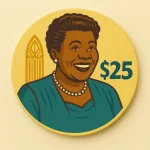
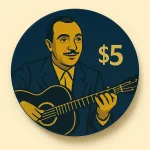
Tina said that with the hybrids I should eschew the photo realistic ones (left 3) and use more cartoon oriented pictures instead as they print better, and that there's no way the photorealistic ones can be printed on hybrids which was why I completely swapped to the less detailed cartoon type graphics for the printed labels (inlay?).

I saw samples of text/word logos being printed outside of the label directly on the chip (hybrids) itself and they look blurred/'watered down'
 
Sorry for posting again, can't seem to find an edit function.

After looking at one of your posts comparing how a skeleton and aladdin prints on a ceramic I get why Tina was steering me away.

Basically if I want photorealistic images with more detail, I need to completely go with hybrids because of the ability to print on the middle inlay. Anything outside of the sticker will look dull and darker.

So I gotta completely go with Hybrids because of the limitations of bleeding and clarity on the Ceramics.

And because I'm working on 'a smaller canvas' I'll have to reduce the designs to 29mm as you suggested and also make sure it's not that cluttered then sending the pngs to you or one of the converters (.ai or .svg)

Dang... That's another possible 60 hours of working with chatGPT. 🤦🏻
 
Consider hiring a designer here to save yourself time and ensure a better result. Since you already have most of the 'look' down, a designer can help with the final touch-ups and tweaks that make chips look their best. I believe @Colquhoun does this (is this true?), and I know @Okku has experience finalizing designs and ordering with TINA. I don't know their rates, but if you've got a bit of budget they could make this project a smashing success :)
 
Whatever you decide to do, you need to fix the Django Reinhardt image. His iconic guitar and famously disfigured left hand must be included. :cool

1761257094920.webp
 
Last edited:
Tina said that with the hybrids I should eschew the photo realistic ones (left 3) and use more cartoon oriented pictures instead as they print better, and that there's no way the photorealistic ones can be printed on hybrids which was why I completely swapped to the less detailed cartoon type graphics for the printed labels (inlay?).

I saw samples of text/word logos being printed outside of the label directly on the chip (hybrids) itself and they look blurred/'watered down'
I have done printed photos with great results. I used a raster photo of the sunset behind Vic in the pioneer Club chips and I believe @improviseallday used a photo for his Makai chips:
IMG_7284.webp

They should print very nicely on the hybrid labels, but they do get darker and a bit more saturated, so I suggest planning for that.

I have also used photos to print on the textured no-molds. The Golden Nugget hotstamp chips are entirely a photo, including the faux mold. Granted, some items do get blurrier and thicker on no-molds. I think if you want to do no-mold chips, using the cartoon/vector style for your chips is recommended.
IMG_1335.webp


And because I'm working on 'a smaller canvas' I'll have to reduce the designs to 29mm as you suggested and also make sure it's not that cluttered then sending the pngs to you or one of the converters (.ai or .svg)

Dang... That's another possible 60 hours of working with chatGPT. 🤦🏻
For the art, no need to reduce anything. It's better to have larger images and reduce them in the software to retain detail. My only siggestion is to not provide images already mocked up on a curved chip, as that will be done in Illustrator. A rectangular photo (or ai image) like the Django one in @Beakertwang's post above is great.
 
  • Like
Reactions: Gus

Create an account or login to comment

You must be a member in order to leave a comment

Create account

Create an account and join our community. It's easy!

Log in

Already have an account? Log in here.

You have insufficient privileges to reply here.
Back
Top Bottom