SeanGecko
4 of a Kind
Shhhh don't interrupt the man while he's in the groove!This guy... how many extra miles do you have left to go?! Unreal work!


Shhhh don't interrupt the man while he's in the groove!This guy... how many extra miles do you have left to go?! Unreal work!

This might have been covered before, but why does the tool not have CMYK colors and uses RGB colors? Thanks
.ai (Adobe Illustrator) as the underlying format because it's a proprietary file format and does not have public documentation.
If I may be so bold…showcase mode? Your render looks amazing!!
 I decided to bang out a couple other smaller improvements (like gallery image change), so I got a little distracted, but glad to hear it's still something that people are interested in!
You can now visualize your entire set of chips on the felt!
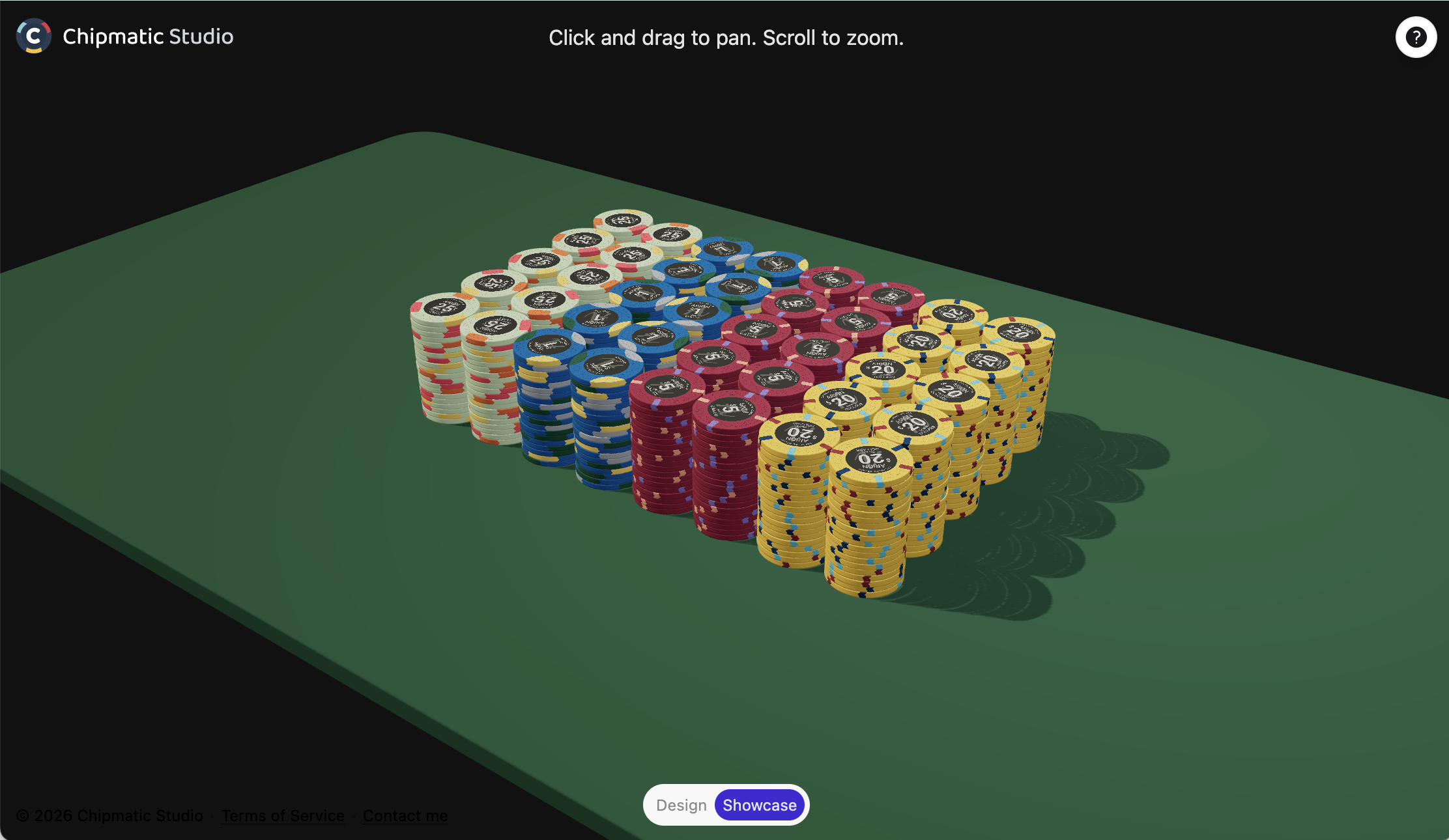
The view is pretty static right now: it automatically displays two racks of each chip, but I plan on making this configurable in the (near?) future. I hope to add additional configuration, splashed pot views, and higher quality renders in the future. Maybe even ray tracing? We'll see where what feels fun
I know this screenshot doesn't look that different than the preview I posted a...


QuietMaple updated Chipmatic Studio (a poker chip design tool) with a new update entry:
Added "Showcase" mode for visualizing chips in 3d scene
Read the rest of this update entry...
I just screenshot and crop.Might be the coolest feature yet - I'm blown away how cool this showcase mode is!! Future released for this, namely being able to more easily view and capture/screenshot the look of the showcase, would be next level. @QuietMaple is my hero. Thanks for doing all that you do - I'm obsessed with Chipmatic Studio
I've just added another homage to vintage poker chips. As with all of the inlay templates, you can tweak the layout, colors, fonts, text, etc. in many different ways.
Keep it classic:
View attachment 1683527
Or get creative:
View attachment 1683529

@QuietMaple do you (or anyone else) know the hex color codes for the base and spots on the ’Mr Burns’ $1? Thanks!
Thank you very @QuietMapleBased on the attached image, I'm getting:
Yellow: #f8ec1b
Pink: #ed3393
Blue: #1364a1
Hm, yeah I could probably add that. I would likely add it to the "showcase" mode to avoid making the chip building interface too complicated. I've been wanting to add other display configuration features to showcase mode in general.Can you add some way to have some of the chips in the stack flipped over, either in the design or showcase? That way we can see what a stack looks like for chips whose edge spots aren't symmetrical. Like this:
View attachment 1687421
In the middle, and just above the mini chips at the bottom. There is a little blue toggle for "Design" and "Showcase"Maybe I'm blind, but where do you open the chip(s) in showcase mode?


The "Classic Colors" are CPC colors.

Having actual CPC/Paulson color names (as someone mentioned a while ago) would be of HUGE help. Any hope of adding that to the predefined colors? With hover, long press on mobile, or something...Sorry. Basic is CPC. Vibrant is CPC retro and dayglo. Classic Casino is Paulson.
GamingWithChips pointed it out, but it might be worth noting that if you aren't seeing that control it might be because you're on mobile! I should really add the button to mobile but I procrastinated doing it because I didn't think there was quite enough space. I just gotta figure out a good UI for it...Maybe I'm blind, but where do you open the chip(s) in showcase mode?
Thanks for pointing this out. As you noted, there are various edge cases which make it sort of complicated to decide which way to do the squishing, and you're right that there is logic in there to make sure that "random" squish doesn't diverge. If I do change this in the future, it probably would be through a toggle because I'm hesitant to change the behavior of a feature once it is released if it would affect anyone's saved designs.Also, I'm not sure if this is the intention, but there are gaps in the edge spots for Squish Direction: Alternating:
View attachment 1687464
I would expect it to look like this (which I created by manually with two different line patterns) where the squish direction of neighboring spots match:
View attachment 1687467
I understand the first image DOES show alternating squish directions for each individual spot, but the problem is when the group has no gap between the spots it makes the squish like there are weird gaps. This seams to have been manually fixed for random squish direction, even when the group has gaps between the spots (i.e. in each group, the middle spot's squish direction isn't truly random, it depends on the squish direction of the other two spots in its group):
View attachment 1687468
Not a big deal since I can manually control for it by making several different line patterns, just thought I'd throw it out there. I understand this is probably not worth working on also since there is kind of two different behaviors:
(1) when there aren't gaps between spots in a group, the squish direction of neighbors have to match
(2) when there are gaps between spots in a group, the squish direction doesn't have to match.
Perhaps the best solution is a toggle "Make adjacent spots in a group match squish direction." The user could turn that toggle on or off as the wish for Random or Alternating squish directions. But yeah, probably more work than it's worth.
And molds like scroll?
Would it be possible to have a setting to adjust the barrel breakdown in the showcase, to reflect better the actual chip set breakdown