BigGrizz
Flush
Gotcha. Well at leat we have a conversion chart from the Paulson color pallet.


You can follow that warning for most sites.Well stick around! Its a fun community that has sucked me in. Beware the politics sub though... it gets weird in there. Lol

So glad you like it!made an account just to say how cool this is! I'm starting to design my first set and was looking for a tool just like this. Great work so far!

Thread ceased to exist while I was looking at it, lolIt's here! I've gotten Chipmatic to a place where it can be shared. Check it out: (moving to Resource)
It's here! I've gotten Chipmatic to a place where it can be shared. Check it out: (moving to Resource)

Security dot looks a little big.I uploaded a .svg with an inlay that was sized at 28mm, but it was tiny. What size do I need to make it for it to show correctly in Chipmatic? Pic is after sizing it up to 55mm.
View attachment 1602188
loving your blue chip!Love how you can get kinda crazy with the spot patterns
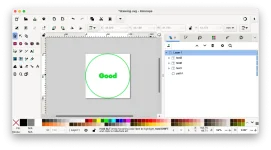
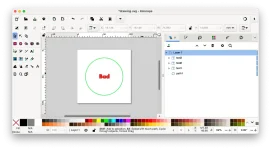
I think what's going on for you is that you have a circular inlay inside a larger canvas. You should size the canvas down to a square of the same dimensions of your circle. In Inkscape you can do this by going to Document Properties -> Display -> Resize to content and it it will automatically fit your content. The actual "mm" of the graphics don't matter because SVGs are infinitely scalable.I uploaded a .svg with an inlay that was sized at 28mm, but it was tiny. What size do I need to make it for it to show correctly in Chipmatic? Pic is after sizing it up to 55mm.

Thanks for the reply! I think that is the issue. I have a blended ring around the inlays that is much bigger than everything else. I'll remove that and try again.I think what's going on for you is that you have a circular inlay inside a larger canvas. You should size the canvas down to a square of the same dimensions of your circle. In Inkscape you can do this by going to Document Properties -> Display -> Resize to content and it it will automatically fit your content. The actual "mm" of the graphics don't matter because SVGs are infinitely scalable.
I've uploaded two screenshots to illustrate this. If you are still having problems, feel free to send me the svg and I can take a look.