
[Preview] Chipmatic - A tool for quickly designing chips with parameters (for Tina ceramics, etc.) (3 Viewers)

Status
Not open for further replies.

QuietMaple

Two Pair
Supporter Pro
Joined
Jun 21, 2025
Messages
288
Reaction score
898
Rewards
276
Location
USA
I've been working on a tool, called Chipmatic, that I think a lot of people here will be able to get some use out of. It's not quite ready for release just yet, but I wanted to share a preview to hopefully generate some excitement (to keep me motivated!), and also to get feedback from folks about what would be useful to see in a tool like this.

I started creating Chipmatic for my own use: I wanted to be able to make custom designs in a way similar to the CPC and Paulson design tools, but I wanted the freedom to use whatever patterns and colors I wanted instead of being constrained to the offerings from those companies. And I also wanted to be able to quickly compare similar designs by just tweaking a few parameters (spot width, count, etc.). Ultimately, the tool will be able to export svg files that can be sent to a custom chip manufacturer like Tina.

A gif is included below that shows some of the functionality. Let me know what you think!
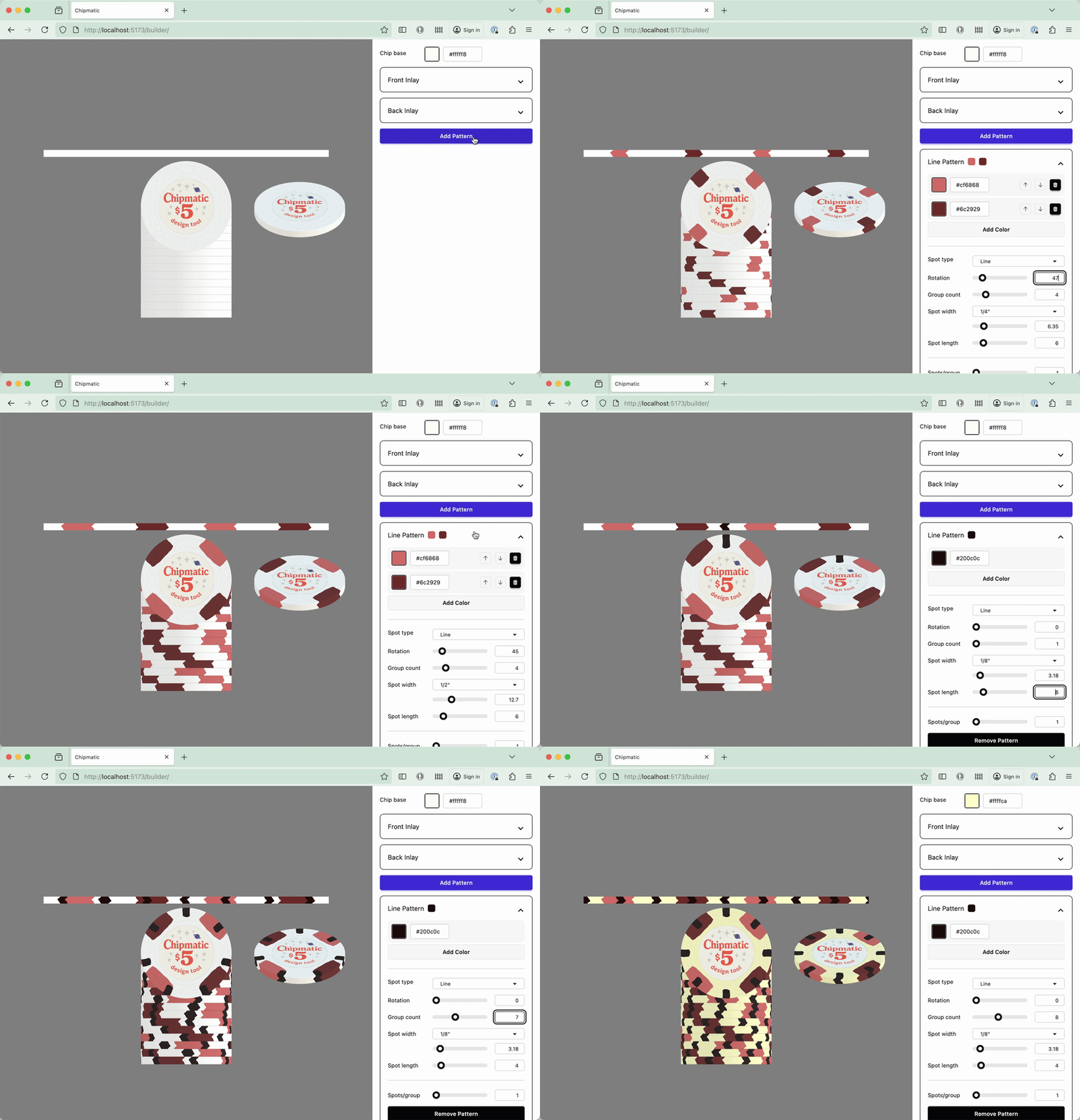
output.gif
 
This looks really cool for the obvious reasons as well as being an awesome way to finish a set you already love but need additional denoms for - excited to see the finished product
 
Curious on an the spots you got set up
Right now I've got lines, circles, triangles, and pie (all have configurable widths, lengths, and/or pie angle (e.g. 1/4, 1/2, etc.)). You can create more complex patterns with layers. Any other shapes you think would be useful? I was mostly going off of the options available in the CPC tool.
 
Oh man...indeed this tool would be amazingly useful. And what would be really, really helpful is if you could (with the original designers' permissions of course) integrate in the publically available pre-designed chips and, for mix and match use, the pre-designed labels that are available for viewing here.
 
Right now I've got lines, circles, triangles, and pie (all have configurable widths, lengths, and/or pie angle (e.g. 1/4, 1/2, etc.)). You can create more complex patterns with layers. Any other shapes you think would be useful? I was mostly going off of the options available in the CPC tool.
Definitely add the ones from the Paulson one too
Also the $5's do you have these?
1000019906.webp
1000019970.webp
 
Also the $5's do you have these?

I think I'll need a "trapezoid" spot, which looks like what you've got on the red/green $5. I can get kinda close with a narrow "pie" spot, but it's not quite the same.

Bear claws are possible by adjusting the spacing on line spots.

Chipmatic also can't quite do the shape you have on the black/blue/yellow/red $1, but that should be pretty easy if I add a parameter to line spots to terminate the line with a circle radius instead of the slight bulge outwards that I currently have.


Screenshot 2025-10-19 at 10.47.59 PM.webp
 
Great work so far. I enjoy adding my own center art given the chance too.
Thank you! That will definitely be possible. I'd love to even allow the user to customize the inlay artwork, but that would require some sort of templates I think, which would really expand the scope of things.
 
I think I'll need a "trapezoid" spot, which looks like what you've got on the red/green $5. I can get kinda close with a narrow "pie" spot, but it's not quite the same.

Bear claws are possible by adjusting the spacing on line spots.

Chipmatic also can't quite do the shape you have on the black/blue/yellow/red $1, but that should be pretty easy if I add a parameter to line spots to cut terminate the line with a circle radius instead of the slight bulge outwards that I currently have.


View attachment 1579368
That's pretty close and Tina can always make it a bit more natural as well.
 
Love it, would also be good if you could have some preset colors. Possibly consider:

https://www.pokerchipforum.com/thre...-colors-converted-to-cmyk-rgb-pantone.119694/

I would love to learn more from you and other experienced designers about how Tina handles colors. I haven't actually ordered custom design from her before, so I'm making some assumptions. Does she prefer colors in a certain format? Does she have a specific palette?

I've been working on a "soft-proof" feature that will convert the RGB colors that a user selects in the application to the closest colors in a physical print profile so that the user can preview what it might look like once it's actually printed. There is a bit of guesswork here though because I don't have Tina's icc profile (I'm using a generic one). But, hopefully this feature will be useful enough to at least show people that their bright neon colors are aren't going to be quite as fluorescent on a physical chip.
 
I would love to learn more from you and other experienced designers about how Tina handles colors. I haven't actually ordered custom design from her before, so I'm making some assumptions. Does she prefer colors in a certain format? Does she have a specific palette?

I've been working on a "soft-proof" feature that will convert the RGB colors that a user selects in the application to the closest colors in a physical print profile so that the user can preview what it might look like once it's actually printed. There is a bit of guesswork here though because I don't have Tina's icc profile (I'm using a generic one). But, hopefully this feature will be useful enough to at least show people that their bright neon colors are aren't going to be quite as fluorescent on a physical chip.
Tina recently changed her sublimation dye printer, which seems to generally be more color accurate to provided CMYK colors (assumed best format). Only main thing Tina prefers is to have all of the final art vectorized (chip, edge spots, rolling edges).

There are issues with colors here/there, but for the most part the chips come out close enough (unless someone tries to color match inlays... spoiler alert - don't).
 
This could really help out the Tina purchasing scene. I am just publishing my first set, but I have ideas for a second. Would love to try out this tool when ready.
 
We have a decent amount of Public Molds that we can put on there. What do you think @QuietMaple ?
Not sure if that was covered yet.
Yep, could definitely add more molds. I only have web mold implemented at the moment, but the others (especially the geometric ones) could be added.
 
@QuietMaple Do you need some help with this? I can help you host this or help with some backend work.

To make fantastic we need the community to get involved:
1) Save Designs
2) Choose from community designs
3) Upvote/Categorize community designs.

We have cool TINA designs. To make this work with Chipmaker - every single chip inlay image would have to be saved. This includes the colors and configurations. Then we could fetch them from the database.
 
Wow amazing tool! Good job!
I would add an option to alter the 'warpiness' of the spots on the rolling edge (arrow shaped now) for people who prefer straighter lines (like me)
 
I wanted to show off one of the other design features available in Chipmatic: edge spot distortion.

Users can tweak how much distortion there is in the edge spots. Line spots have three different parameters to modify: "cap length" is what I call the slight curvature to the top of end of the spot. This can be nothing, extreme, or anywhere in between. You can also adjust the overall distortion of the spot's shape by adjusting both amplitude (how much movement there is in the distortion) and frequency (how closely spaced together the distortions are).

There will also be parameters to adjust the level of edge spot "squish" (on the side of the chip), but that isn't implemented yet.

output.gif
 
I wanted to show off one of the other design features available in Chipmatic: edge spot distortion.

Users can tweak how much distortion there is in the edge spots. Line spots have three different parameters to modify: "cap length" is what I call the slight curvature to the top of end of the spot. This can be nothing, extreme, or anywhere in between. You can also adjust the overall distortion of the spot's shape by adjusting both amplitude (how much movement there is in the distortion) and frequency (how closely spaced together the distortions are).

There will also be parameters to adjust the level of edge spot "squish" (on the side of the chip), but that isn't implemented yet.

View attachment 1581151


Amazon Studios Salute To You GIF by Amazon Prime Video
 
I wanted to show off one of the other design features available in Chipmatic: edge spot distortion.

Users can tweak how much distortion there is in the edge spots. Line spots have three different parameters to modify: "cap length" is what I call the slight curvature to the top of end of the spot. This can be nothing, extreme, or anywhere in between. You can also adjust the overall distortion of the spot's shape by adjusting both amplitude (how much movement there is in the distortion) and frequency (how closely spaced together the distortions are).

There will also be parameters to adjust the level of edge spot "squish" (on the side of the chip), but that isn't implemented yet.

View attachment 1581151
This is all very cool! This is for visualization/mockups, correct? ...or are you anticipating the ability to export separate label and chip CMYK .ai files?
 
are you anticipating the ability to export separate label and chip CMYK .ai files?

Very much planning on being able to export vector image files! Right now I'm targeting SVG because the .ai format is proprietary and therefore not documented. My understanding is that Tina can print from SVGs.

As for color spaces, SVG can't store true CMYK values, but I plan to have the option to convert the RGB colors in the design to their nearest print equivalents in the CMYK gamut before export, which should give the user an idea of what their colors would look like on the physical chip.

Outputting in PDF format would also be an option, which I believe supports CMYK more directly than SVG, but I don't know if Tina deals with PDFs.

I come from a software background though, not print design, so if you or anyone else has tips on how to create files that are most appropriate for printing, please let me know.
 
Status
Not open for further replies.
Back
Top Bottom