

NEW ROULETTE WINNING NUMBER DISPLAY
I'm something of a casino gear addict. I’ve been looking for a roulette winning number display for a while now. New systems with a sensor that recognizes where the ball stops can run around $7,000. Even a casino-used leftover can run around $4,000, if you can find one. Until recently, I was mirroring a laptop screen with a nice background image and an Excel chart to display numbers. Toggling up and down and entering the numbers by hand was time-consuming and distracting.
In early March, I found a company based in Hong Kong that manufactures a “mini PC” preprogrammed to display roulette winning numbers. Call it a "Tina" roulette display system, though my rep was named "Mia."
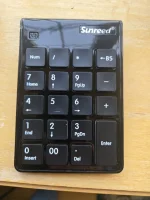
Basically, it’s a 6” x 5” black box that runs Windows offline. The roulette display programming is loaded on a thumb drive, and it comes with a wireless number pad to enter the winning numbers and a mouse to point and click to open the program, along with all the necessary wires/connections.. At $480, it’s cheaper than buying a dedicated laptop and paying someone to write code. (I don’t code.)
Optional monitor:
The company offers a 27-inch two-sided monitor to pair with the unit for $520. If you don’t need a two-sided monitor, you could use your own. I opted for the two-sided monitor. It's mounted on a pole that raises everything 16 inches above the table. The frame is 3.5 inches thicker at the bottom, so the bottom of the screen is 19.5 inches above the table.
Weight: The weight of the monitor and pole assembled is 20.2 pounds. It feels heavier.
Material: Metal monitor frame and pole. Reinforced wires. I got the black frame. They also offer gold.
Options: Single or double 0 layout, several layout colors. (red, blue, green, purple, maybe others.)
Turnaround time was three weeks. Ordered on March 7. Shipped on March 18. Delivered in two boxes, March 25 and today, March 30.
Left: The display with a green background. Center: Hit "+" "6" end "enter" to put the 6 up as the last winning number and all the outside bets, too.
When you hit "+" again on the wireless number pad (right), the layout goes back to all green until you enter a new number.
PROS:
The price: $480 for the Mini PC and all necessary hardware; $520 for the 27-inch two-sided monitor. Shipping from Hong Kong was $269. Tariff was $56. Add a power plug adapter from Amazon for $15 and my total cost was $1,340 delivered. (It still beats $7,000.)
The appearance: The whole package -- monitor and display -- looks very professional. The connection is HDMI, so the image is sharp and bright. They offer American “double 0” or European “single 0” layout options in several background colors. I chose green to match my table layout.
The action: The system is still "manual entry," but it's quick. You use a wireless number pad that looks like a calculator. When you hit the plus sign (+), the numbers scroll across the top of the screen. They’re in the same order as they appear on the wheel. When the ball lands, just hit that number on the keypad and hit enter. The scrolling numbers stop with the winning number highlighted and the winning number appears at the top right blinking. The winning number is highlighted in bright blue on the layout, as are all the winning outside bets. (The 12s, the columns, red or black, odd or even.)
Hit the plus sign again and the board clears and the numbers move across the top again, mimicking the wheel in motion.
Assembly: Almost none. The pole is threaded and screws on to the display. Then just plug everything in and hit the power button on the black box. Click the Roulette icon on the screen and the first box to open. (The word "open" is in Chinese.) You will have to drill a hole in your roulette table to mount the pole -- or mount it on something sturdy. (I haven't done that yet.)
CONS:
Price: With the double-sided monitor, it's $1,000 for the whole package before shipping. The price may still be too steep for many, but if you already have a monitor you can mount in portrait orientation, your cost is $480 plus shipping.
No sensor: The system still requires manual input. It does not recognize into which fret the ball lands. But it's quick and easy.
Culture shock: Windows opens with familiar logos and icons and some English, but about two-thirds of the writing is in Chinese. This is not a major hurdle. The roulette program icon is easy to spot and its name is in English. Click on it to open the program and the X to close it. Easy.
I should be able to change the computer's language to English by following a tutorial on YouTube.
If you’re interested, PM me for their contact info. (You would then deal directly with them.)
Stay tuned for photos of this mounted on the roulette table in a few weeks.
Attachments
Last edited:


