Poker Club HQ

Featured Poker Club HQ (2 Viewers) 5.0.0

No permission to download

AppMakerRonB

Pair
Supporter Pro
Joined
Jan 18, 2024
Messages
102
Reaction score
274
Rewards
193
Location
Colorado
AppMakerRonB submitted a new resource:

Poker Club HQ - Poker tournament manager — full featured and cross platform: iOS, Android, and the web

The ultimate app for planning and running your tournaments and tracking player stats.

View attachment 1631026
  • Muti-device support with real-time syncing between any number of devices or screens. Optional QR Code on the timer screen allowing anyone to connect to a live read-only view, with no need to create an account or even download the app.
  • Full featured player and table management:
    • Import player names from CSV files...

Read more about this resource...
 
Awesome, I was going to suggest you start your own thread and get out of that other one lol
 
@Poker Zombie I think that is correct. Once you log back in, it should still be running…but geez, you guys never heard of batteries?? Lol.
 
@Poker Zombie, someone closed the last thread, not sure who or why, but here's your question:

Screenshot 2026-02-02 at 4.17.25 PM.webp


And the answer:
Yes. Even if you're not signed into an account (so the tournament isn't synced to the cloud). If you create a tournament and start the timer, then kill the app, and restart it a hour later, the timer will be an hour into the tournament when you reopen it. Or, if you export/download the tournament file, then delete the app, reinstall it and import the tournament file, the tournament will be an hour (or how ever much time elapsed) into the tournament, with all blind changes, etc. that happened in the meantime in the log.
 
Last edited:
Suggestion-
Add delete option to blinds and breaks.
I accidentally added a duplicate and only option currently is to drag to bottom and/or change to use as next level.

Another idea I would find useful-
Not really needed but an extra screen where chip counts/qty totals could be entered to help recall starting stack qtys if they are saved into tourneys. Or maybe show on the screen under each chip so players could double check their stacks before start.
 
Last edited:
Suggestion-
Add delete option to blinds and breaks.
I accidentally added a duplicate and only option currently is to drag to bottom and/or change to use as next level.

Another idea I would find useful-
Not really needed but an extra screen where chip counts/qty totals could be entered to help recall starting stack qtys if they are saved into tourneys. Or maybe show on the screen under each chip so players could double check their stacks before start.
You can delete a level by swiping it left
 
You can delete a level by swiping it left
Thanks!
I'm not well versed in all the gestures and didnt think of that. My son gives me a hard time and shows me all the crap he can do on his IPhone via gestures. I prefer a button or icon since half the time one gesture on one device does something different on a different device like my Samsung.
 
Any rough idea on how you'll implement pricing? Subscription or one time fee or?
 
Subscription, and I'm gone for good.

One time pricing, I'm cool - but I'm from the era for shareware, where developers made bank because decent human beings donated money to the developer.

I'm not sure if there are decent people under the age of 30 anymore, so this concept may be broken today.
 
Any rough idea on how you'll implement pricing? Subscription or one time fee or?
Haven't nailed down all the details yet, but it will always be free for single table games, and for more tables there will be non-subscription options. Something like a one-time fee that will cover use with N tables for a month, 6 months, or a year.
 
Haven't nailed down all the details yet, but it will always be free for single table games, and for more tables there will be non-subscription options. Something like a one-time fee that will cover use with N tables for a month, 6 months, or a year.
If going the subscription or per time fee, consider a “life-time” subscription option as well. I think our club would do something like that if not exorbitant.
 
Also, if you are open to options on the app, I would love to see an option to put a knock out button on the main screen. I would consider that more useful than the tourney reset button. Just my wish list. But I can make it work the way it is. It is just extra steps to knock out a player.
 
Also, if you are open to options on the app, I would love to see an option to put a knock out button on the main screen. I would consider that more useful than the tourney reset button. Just my wish list. But I can make it work the way it is. It is just extra steps to knock out a player.
When I'm running a tournament, I'm usually controlling things from the app on my phone, which I keep in the Tables screen so I can quickly record knock-outs, initiate add-ons, rebuys, or reentries, and see the "tables out of balance" and consolidation notices.

I have the tournament shared (read-only via QR Code or URL) to one or more laptops (running the web app) or iPads or Android tablets (running the iPad or Android app), which are sometimes connected to TV or projector so all the tables can see the timer screen.

If you're air-playing (iOS/iPadOS) or casting (Android) your phone's timer screen to a TV or something, I can see needing to keep your phone on the Timer screen. I'm curious how prevalent this set-up is, versus a multi-device setup that uses sharing.

Anybody want to chime in with the setup you use most often?
 
I may be doing something wrong. But my iPads always mirror the screen my phone is on. In the old app, I had each iPad with the app on it and then I would share the tournament to them. The screen changes when I change my phone screen.

So, I just did a little trial with your new app. I have one iPad using the QR code read only. The other iPad is logged into my account. My phone is logged into my account. When I change the screen from the timer to seating on my phone, all 3 screens change.
 
I typically would have my phone on the timer screen because in the past the shared screens were keyed to whatever was being shown on it so I can control everything from my seat. I see what you are saying about just using the QR code on remote devices, but I don't know that I will do that just because it adds an additional step to setting up, as opposed to just clicking the app and having it run automatically. My league has a different host every month and I bring the equipment so I am usually trying to move quickly and efficiently to set up, get connected to their wifi, place the monitors, etc., but might do it differently if I was using the same room/location every time.
 
Ok. I see now. I was using the screen with the arrows going in opposite directions to change the screen. That changes it on all 3 screens. If I go to the 3 lines icon and choose tables from there? It works as you describe. That would work for me. I just got to remember how I did it. :).
 
Ok. I see now. I was using the screen with the arrows going in opposite directions to change the screen. That changes it on all 3 screens. If I go to the 3 lines icon and choose tables from there? It works as you describe. That would work for me. I just got to remember how I did it. :).

At the top of the main menu are controls to control the timer too, so you can control the timer no matter what scree you're on:

timer-00005.webp
 
oh, and if you press and hold on either the previous or next button, it shows a menu with all levels so you can quickly switch to any blind or break level:

timer-00002-2.webp
 
I typically would have my phone on the timer screen because in the past the shared screens were keyed to whatever was being shown on it so I can control everything from my seat. I see what you are saying about just using the QR code on remote devices, but I don't know that I will do that just because it adds an additional step to setting up, as opposed to just clicking the app and having it run automatically. My league has a different host every month and I bring the equipment so I am usually trying to move quickly and efficiently to set up, get connected to their wifi, place the monitors, etc., but might do it differently if I was using the same room/location every time.
I'm curious, how do you display the tournament timer screen on the monitors? I sometimes use an old phone, tablet, or laptop connected to the monitor via HDMI cable. In my experience, it's proven more reliable than depending on AirPlay or Google Cast.

I am working on a solution to support read-only tournament sharing that will automatically switch to showing the latest running tournament. That way, there will be no need to update each remote device to display the new tournament when it changes. This will be particularly useful if you run multiple tournaments in a night.
 
I'm curious, how do you display the tournament timer screen on the monitors? I sometimes use an old phone, tablet, or laptop connected to the monitor via HDMI cable. In my experience, it's proven more reliable than depending on AirPlay or Google Cast.

I am working on a solution to support read-only tournament sharing that will automatically switch to showing the latest running tournament. That way, there will be no need to update each remote device to display the new tournament when it changes. This will be particularly useful if you run multiple tournaments in a night.
Previously, I had my phone on me and set up two Ipads as strategically as possible in the room(s), one per table. I also connect the Ipads to backup battery/chargers so I don't have to worry about being near a wall socket, or them running out of juice. They are all connected via wi-fi and the app's remote share, so I am not using airplay or casting to them.

With the old IOS app/timer I would have the tournament started on my phone and then share/have the two ipads connect to the tournament with the remote connection function. It worked well 95% of the time although I would sometimes have one of the ipads randomly not start running again after a pause and would have to reconnect it to the shared tournament. They would keep running even if I had to use my phone for something else or moved off the app for some reason.

I think this new set up is going to be even smoother. We have a game tomorrow night and I am looking forward to running it for a real game. I have run multiple simulations, but am ready to see it working in real world conditions and will let you know of any issues I spot.

Would still love the ability to be able to completely customize payout and have them auto change depending on number of buy ins in accordance with my leagues custom payout schedule.
 
I'll add this to my list. :)
Thanks Ron! I feel like all we do is ask you for stuff and complain...lol. So, I want to say:

THANK YOU! THANK YOU! THANK YOU!

I, for one, really appreciate you coming onto the forum and accepting and implementing suggestions for changes to the application from all of us crazy chip collecting poker players. This app is already awesome, and your refinements are just making it better and better. Being able to add our custom chips on it is fantastic. All of your hard work is much appreciated.
 
Hey guys, original poster of the old thread here - I'm glad this took off and someone picked up the reins! My apologies for abandoning the project, I was going through a divorce at the time and well... life has a way of beating you down. I'm excited to try out the Poker Club app as I get into playing again here.

I'll submit some of the original designs I was working on before, as I'm first and foremost a UI designer more than a coder... it seems like Ron is the man for the coding job! I'm available to work on a fork for the UI if you ever want a UX/UI specialist pitching in on this @AppMakerRonB !

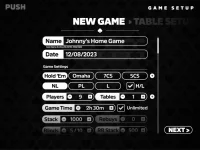
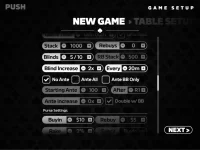
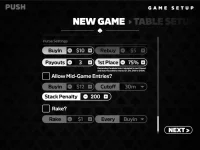
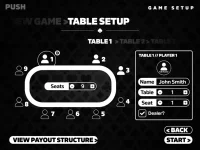
Here's a couple screenshots from the UI I was starting to play with.
 

Attachments

  • push-1.webp
    push-1.webp
    33.1 KB · Views: 51
  • push-2.webp
    push-2.webp
    43.1 KB · Views: 45
  • push-3.webp
    push-3.webp
    40 KB · Views: 45
  • push-4.webp
    push-4.webp
    37 KB · Views: 45
  • push-5.webp
    push-5.webp
    39.9 KB · Views: 52

Create an account or login to comment

You must be a member in order to leave a comment

Create account

Create an account and join our community. It's easy!

Log in

Already have an account? Log in here.

Back
Top Bottom